Lab - Application Package
In this lab you will structure your e-commerce application as a proper application package with query profiles. You will also add a rank profile placeholder and redeploy to see live configuration changes.
Prerequisites
Your Vespa container should be running with the 20-product dataset from Lab 2.
Review Your Current Structure
Your ecommerce-app/ directory should look like this:
ecommerce-app/
├── schemas/
│   └── product.sd
└── services.xml
This is already a valid application package. Now we will add query profiles and prepare the structure for future labs.
Add Query Profiles
Query profiles let you define named bundles of default parameters. Create the query profiles directory:
mkdir -p ecommerce-app/search/query-profiles
Create ecommerce-app/search/query-profiles/default.xml:
<query-profile id="default">
  <field name="hits">10</field>
  <field name="ranking">default</field>
</query-profile>
Create ecommerce-app/search/query-profiles/mobile.xml:
<query-profile id="mobile">
  <field name="hits">5</field>
  <field name="timeout">2s</field>
</query-profile>
The default profile applies to all queries unless overridden. The mobile profile returns fewer results and has a shorter timeout, suitable for mobile clients. Note that hits sets the default result count for the profile - if you wanted to also enforce an upper bound that callers cannot exceed, you would add maxHits as well.
Add a Rank Profile
Open ecommerce-app/schemas/product.sd and add a simple rank profile after the document-summary short block, before the closing } of the schema:
  rank-profile default {
    first-phase {
      expression: nativeRank(title, description)
    }
  }
This makes the default ranking explicit rather than relying on the implicit default. In Lab 4 you will add more rank profiles.
Review the Full Package
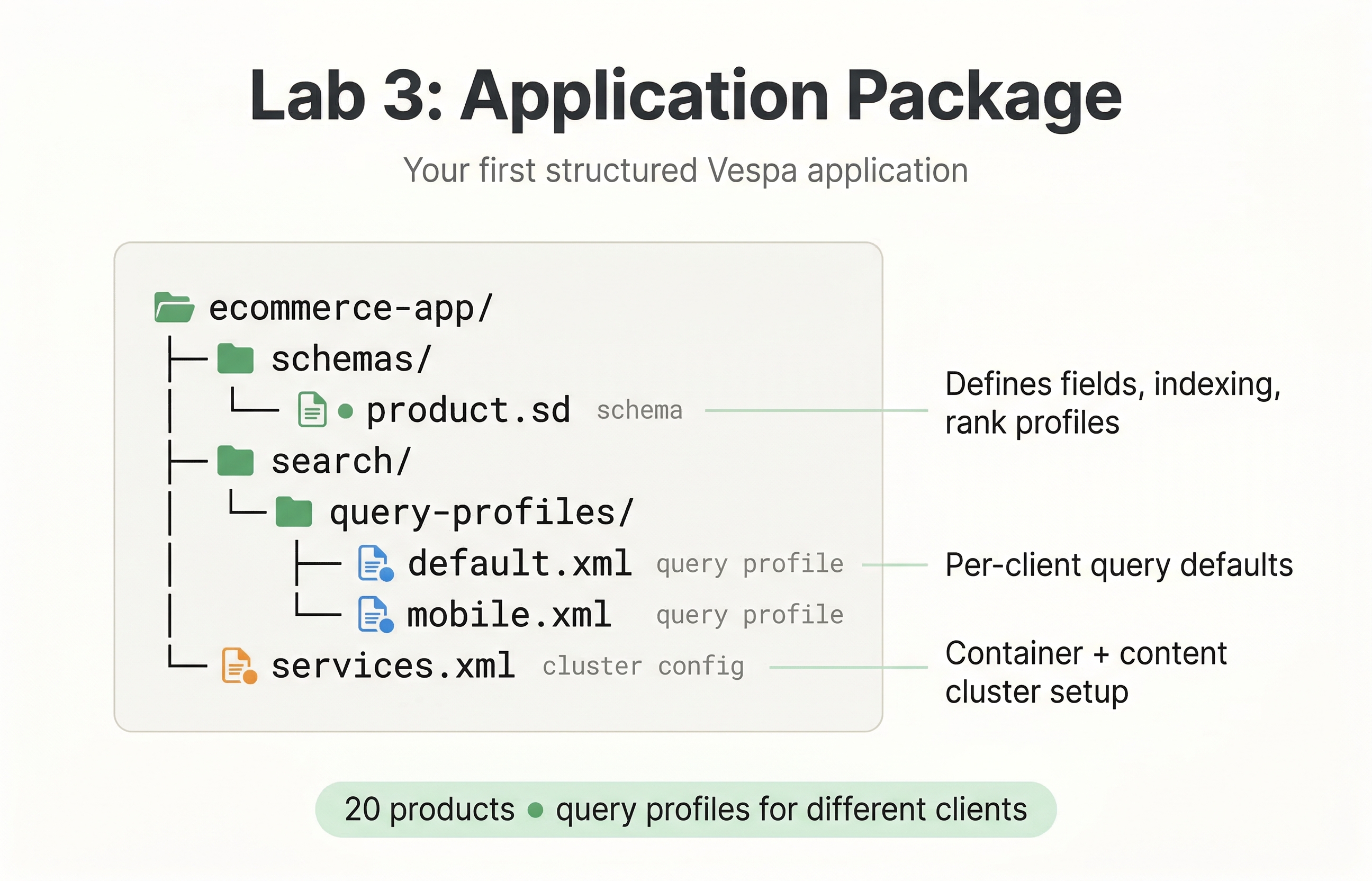
Your application package should now look like this:
ecommerce-app/
├── schemas/
│   └── product.sd
├── search/
│   └── query-profiles/
│       ├── default.xml
│       └── mobile.xml
└── services.xml
Redeploy
vespa deploy --wait 300 ecommerce-app
Vespa applies changes live. Your 20 products are still there, now served with the new query profiles and explicit rank profile.
Check Application Status
After redeploying, it is a good idea to verify that everything came up healthy. Run the built-in status command:
vespa status
This shows whether the config server and container services are running. If anything went wrong during deployment, you will see it here.
You can also hit the config server status endpoint directly:
curl -s http://localhost:19071/status
A healthy response means the config server accepted your application package and is serving it to the cluster.
To see how many documents are in the system, you can query the metrics endpoint:
curl -s 'http://localhost:8080/metrics/v2/values' | python3 -m json.tool | grep -A2 'documents.active'
Or, if you prefer a simpler approach, just query for all documents with zero hits:
vespa query "select * from product where true" "hits=0"
The totalCount in the response tells you how many documents match. With hits=0 you skip the actual results and just get the count:
{
    "root": {
        "id": "toplevel",
        "fields": { "totalCount": 20 },
        "coverage": { "coverage": 100, "documents": 20, "full": true }
    }
}
You should see 20, confirming that your products survived the redeployment.
Test the Query Profiles
Run a query without specifying a profile (uses the default profile):
vespa query "select * from product where default contains 'cotton'"
Now use the mobile profile:
vespa query "select * from product where default contains 'cotton'" "queryProfile=mobile"
The mobile profile defaults to 5 hits and a shorter timeout, so the response will be smaller than the default profile's 10.
Test the Rank Profile
vespa query "select * from product where default contains 'jacket'"
Both the hiking jacket and the denim jacket should appear. The nativeRank function scores them based on how well "jacket" matches the title and description fields.
Verify the Full Package
Run this query as a checkpoint:
vespa query "select * from product where true" "queryProfile=mobile"
You should see exactly 5 hits returned (the mobile profile's hits setting), even though totalCount reports all 20 matches:
{
    "root": {
        "id": "toplevel",
        "fields": { "totalCount": 20 },
        "coverage": { "coverage": 100, "documents": 20, "full": true },
        "children": [
            { "fields": { "title": "Wool blend overcoat", "brand": "ClassicLine", "price": 250 } },
            { "fields": { "title": "Striped cotton polo shirt", "brand": "BasicWear", "price": 45 } },
            { "fields": { "title": "Canvas sneakers white", "brand": "StreetWalk", "price": 60 } },
            { "fields": { "title": "Leather crossbody bag", "brand": "UrbanCraft", "price": 65 } },
            { "fields": { "title": "Running shoes lightweight mesh", "brand": "SpeedStep", "price": 120 } }
        ]
    }
}
What You Built
Your application now has:
- A properly structured application package with schemas, services, and query profiles
- A
defaultquery profile with standard settings - A
mobilequery profile for resource-constrained clients - An explicit
defaultrank profile
The package structure is ready for the rank profiles, embeddings, and models you will add in later labs.
In the next lab, you will add multi-signal ranking with BM25, freshness, and business metrics, plus grouping queries for faceted navigation.