Tensors and Embeddings
Modern AI applications, such as RAG or hybrid search, require vector search. You need to store and search vector embeddings efficiently. Vespa uses tensors to represent vectors and multidimensional data. In this chapter, we explore what tensors are in Vespa, how embeddings are stored, and how to define tensor fields in your schema.
What Are Tensors
In Vespa, tensors are multidimensional arrays of numbers. They are simply Vespa's way of representing vectors, matrices, and higher-dimensional data. A vector is a one-dimensional tensor. A matrix is a two-dimensional tensor. And you can have tensors with any number of dimensions.
For vector search, you work with one-dimensional dense tensors representing embeddings from models like Sentence Transformers, OpenAI, or others. These embeddings capture semantic meaning in vector space where similar concepts are supposed to have similar vectors.
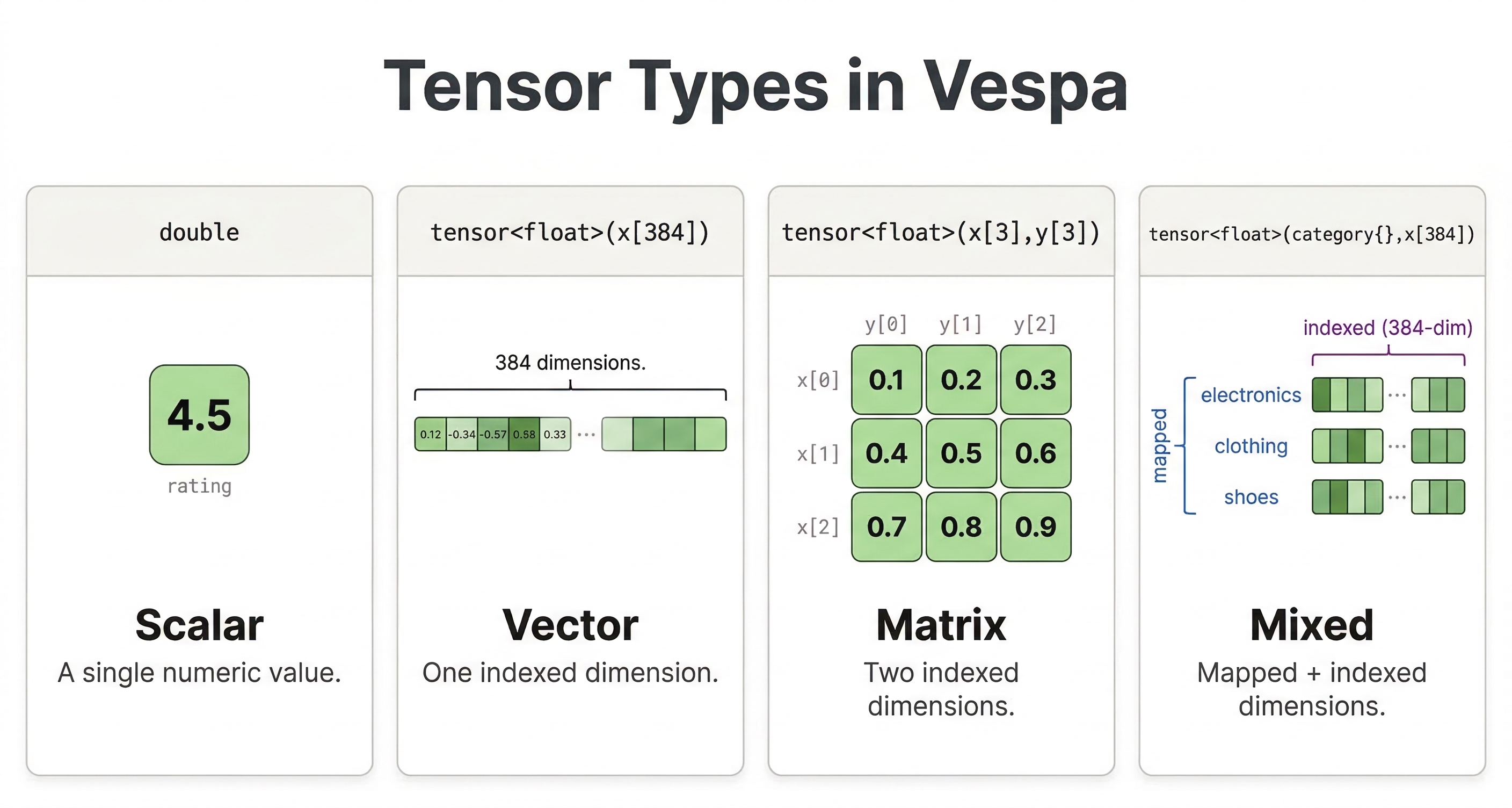
Tensor Types
Vespa tensors have a type specification that defines their structure. The basic format is tensor<type>(dimensions).
A simple vector embedding with 384 dimensions:
tensor<float>(x[384])
This defines a dense tensor with a single dimension called x that has 384 elements. Each element is a float value. The dimension name x is just a convention and can be any valid identifier.
An example of a larger embedding:
tensor<float>(x[768])
Or larger:
tensor<float>(x[3072])
The dimension size must match the output of your embedding model. Using the wrong size will cause errors when feeding documents or querying.
Cell Value Types
Tensors can use different numeric types for their elements. The type affects both memory usage and precision:
| Type | Bytes per value | Notes |
|---|---|---|
float | 4 | Standard choice. Most embedding models output float32 values. |
double | 8 | Rarely needed for embeddings. Uses twice the memory of float. |
bfloat16 | 2 | Half the memory of float. Good when memory is constrained. |
int8 | 1 | Used with quantization techniques. Very effective at large scale. |
For most applications, start with tensor<float>. Move to other types only when you have specific requirements around memory or performance.
Tensor Fields in Schema
To store embeddings in Vespa, you define a tensor field in your schema:
field embedding type tensor<float>(x[384]) {
  indexing: summary | attribute | index
  attribute {
    distance-metric: angular
  }
  index {
    hnsw {
      max-links-per-node: 16
      neighbors-to-explore-at-insert: 200
    }
  }
}
Let's break down each part:
-
The
indexing: summary | attribute | indexstatement tells Vespa to make the field available in search results (summary), store it in memory (attribute), and build a search index (index) for fast nearest neighbor queries. -
The
distance-metric: angularspecifies how to measure similarity between vectors. Angular distance is common for normalized embeddings. Other options includeeuclidean,dotproduct,prenormalized-angular(more efficient when vectors are already normalized), andhamming(for binary tensors). -
The
indexsection configures the HNSW (Hierarchical Navigable Small World) graph used for approximate nearest neighbor search. Themax-links-per-nodeandneighbors-to-explore-at-insertparameters tune the index structure. Higher values improve search quality at the cost of increased memory usage and longer indexing time.
Feeding Embeddings
When you feed documents with tensor fields, you provide the embedding as an array of numbers:
{
  "put": "id:myapp:doc::1",
  "fields": {
    "title": "Introduction to Machine Learning",
    "embedding": [0.123, -0.456, 0.789, ...]
  }
}
The array must have exactly the same number of elements specified in your tensor type. For a tensor<float>(x[384]) field, you need 384 float values.
You can generate embeddings using a model before feeding to Vespa. With Python and Sentence Transformers:
from sentence_transformers import SentenceTransformer

model = SentenceTransformer('all-MiniLM-L6-v2')
text = "Introduction to Machine Learning"
embedding = model.encode(text).tolist()

# Feed to Vespa
app.feed_data_point(
    schema="doc",
    data_id="1",
    fields={"title": text, "embedding": embedding}
)
The model outputs a vector that you include in the document. All documents should use embeddings from the same model, so the comparison is accurate.
Querying with Embeddings
Once your documents have embeddings, you need to send a query embedding to search against them. The idea is the same as feeding: you generate a vector from the query text using the same model and pass it to Vespa as a query parameter.
With the Vespa CLI:
vespa query \
  "yql=select * from doc where {targetHits: 10}nearestNeighbor(embedding, query_embedding)" \
  "input.query(query_embedding)=[0.1, 0.2, 0.3, ...]"
The nearestNeighbor operator takes two arguments: the document field (embedding) and the query parameter name (query_embedding). The input.query(query_embedding) parameter is how you pass the actual vector values. We'll cover nearestNeighbor and targetHits in detail in the next chapter.
In practice, you'd generate the query embedding in your application code and send it along with the query. Here's how that looks with PyVespa:
from sentence_transformers import SentenceTransformer
from vespa.application import Vespa

model = SentenceTransformer('all-MiniLM-L6-v2')
app = Vespa(url="http://localhost", port=8080)

query_text = "how does machine learning work?"
query_embedding = model.encode(query_text).tolist()

response = app.query(
    body={
        "yql": "select * from doc where {targetHits: 10}nearestNeighbor(embedding, query_embedding)",
        "ranking": "semantic",
        "input.query(query_embedding)": query_embedding,
    }
)

for hit in response.hits:
    print(hit['fields']['title'])
The important thing here is that the query embedding must come from the same model you used for documents. If you used all-MiniLM-L6-v2 to embed your documents, you need to use the same model for queries. Mixing models will give you meaningless similarity scores because each model has its own vector space.
Your rank profile also needs to declare the query tensor as an input so Vespa knows what to expect:
rank-profile semantic {
    inputs {
        query(query_embedding) tensor<float>(x[384])
    }
    first-phase {
        expression: closeness(field, embedding)
    }
}
The closeness(field, embedding) function returns the similarity between the query embedding and the document embedding based on the distance metric you configured in the schema. Higher values mean more similar.
Multiple Vector Fields
A document can have multiple tensor fields for different purposes:
field title_embedding type tensor<float>(x[384]) {
  indexing: attribute | index
  attribute {
    distance-metric: angular
  }
}

field body_embedding type tensor<float>(x[384]) {
  indexing: attribute | index
  attribute {
    distance-metric: angular
  }
}
You might embed the title and body separately and search each or combine them in ranking. This lets you do more sophisticated ranking strategies where title similarity and body similarity are weighted differently.
Multi-Vector Fields
Vespa also supports multi-vector fields where a single field stores multiple vectors. This is useful for documents with multiple chunks:
field embeddings type tensor<float>(chunk{}, x[384]) {
  indexing: attribute | index
  attribute {
    distance-metric: angular
  }
}
The chunk{} dimension is a mapped dimension that can have any number of keys. A document might have embeddings for multiple paragraphs:
{
  "embeddings": {
    "para1": [0.1, 0.2, ...],
    "para2": [0.3, 0.4, ...],
    "para3": [0.5, 0.6, ...]
  }
}
When you query, Vespa finds the closest vector among all chunks in each document. This enables multi-vector retrieval, where documents are scored based on their best-matching chunk.
Tensor Expressions in Ranking
Beyond nearest neighbor search, you can use tensors in ranking expressions. Compute dot products, cosine similarities, or any tensor operation:
rank-profile tensor_ranking {
  inputs {
    query(q_embedding) tensor<float>(x[384])
  }
  first-phase {
    expression: sum(query(q_embedding) * attribute(embedding))
  }
}
The * performs element-wise multiplication and sum() adds them up, computing the dot product between query and document embeddings. This gives you full control over how vectors influence final ranking.
Memory Considerations
-
A
tensor<float>(x[384])field uses about 1.5 KB per document (384 elements × 4 bytes). For a million documents, that is 1.5 GB just for embeddings. With redundancy and HNSW index overhead, budget roughly 2-3x the raw embedding size. -
Use smaller embedding models when possible. A 384-dimensional model uses half the memory of a 768-dimensional model. Test if smaller embeddings maintain acceptable quality for your use case.
-
Consider bfloat16 or int8 quantization for very large datasets. These reduce memory by half or more while maintaining reasonable quality.
Best Practices
-
Choose embedding models appropriate for your content and query types. Sentence Transformers work well for general text. Domain-specific models can improve results for specialized content.
-
Keep dimension sizes reasonable. Very high-dimensional embeddings (1000+) offer diminishing returns while consuming significant memory.
-
Use the same model for all documents and queries. Mixing embeddings from different models produces meaningless similarity scores.
-
Store raw text alongside embeddings. Embeddings are for search. You still need the original content for display and other processing.
Generating Embeddings Inside Vespa
So far we've been generating embeddings externally using Python and Sentence Transformers, then feeding the vectors to Vespa. This works fine, but there's another option: you can have Vespa generate the embeddings for you during feeding and querying using built-in embedders.
The idea is simple. You configure an embedding model in your application's services.xml, and then use the embed function in your schema's indexing expression. When you feed a document, you just send the raw text and Vespa runs it through the model to produce the vector automatically.
Here's what the schema looks like:
schema doc {
    document doc {
        field title type string {
            indexing: summary | index
        }
    }

    field title_embedding type tensor<float>(x[384]) {
        indexing: input title | embed my-embedder | attribute | index
        attribute {
            distance-metric: angular
        }
    }
}
The input title | embed my-embedder part takes the title text, passes it through the configured embedder, and stores the resulting vector. You never have to deal with raw vectors in your feed data at all.
This also works on the query side. Instead of generating query embeddings in your application code, you can have Vespa embed the query text:
select * from doc where {targetHits: 10}nearestNeighbor(title_embedding, query_embedding)
And pass the query text with: input.query(query_embedding)=embed(my-embedder, "your search query here").
The advantages are pretty clear: no external embedding pipeline, consistent embeddings across all documents and queries (same model guaranteed), and you can re-embed everything by triggering a reindex without re-feeding. The tradeoff is that embedding generation uses compute resources on your Vespa nodes, so it adds load during feeding and querying.
Setting up embedders requires configuring services.xml, which we cover in the application package module. For full details, see the Vespa embedder documentation.
Next Steps
You now understand tensors and how to store embeddings in Vespa. The next chapter explores approximate nearest neighbor search using HNSW indexes to find similar vectors quickly.
For complete tensor documentation, see the Vespa tensor guide and the embedder documentation.