Hybrid Search
Vector search finds semantically similar documents while text search finds exact keyword matches. Each approach has strengths and limitations. Hybrid search combines both methods to deliver better results than either alone. In this chapter, we explore why hybrid search matters, how to implement it in Vespa, and different strategies for combining text and vector signals.
Why Combine Lexical and Vector Search
Text search excels at precision. When users search for specific terms, product names, or identifiers, text search reliably finds exact matches. It also lets users control results through careful keyword choice. If you search for "python programming", you get documents containing those words.
Vector search excels at recall and semantic understanding. It finds relevant documents that do not contain exact query terms. A search for "fix computer freezing" might return documents about "resolving system hang issues" even though the words differ. Vector search handles synonyms, related concepts, and semantic similarity naturally.
The weakness of text search is missing relevant documents with different wording. The weakness of vector search is sometimes returning semantically related but not relevant results, and poor handling of specific terms or names.
Hybrid search uses text search to ensure precision on important terms while using vector search to expand recall with semantically similar content. The combination typically outperforms either method alone.
Implementing Hybrid Search in Vespa
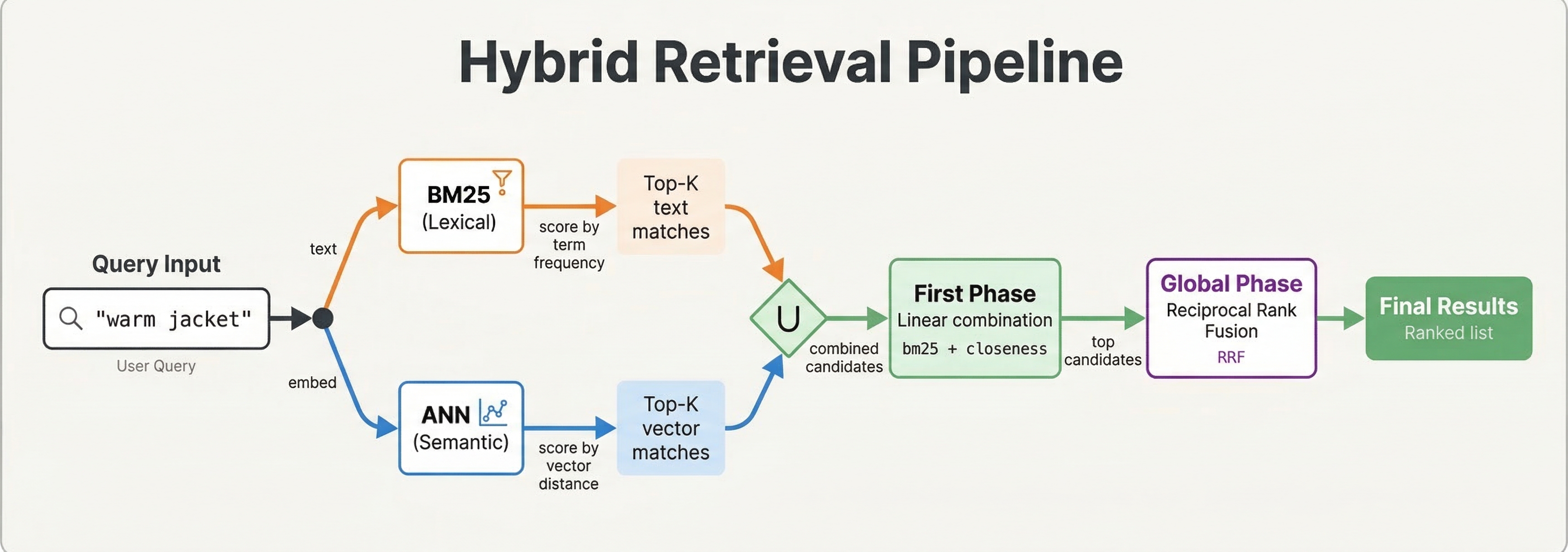
Vespa makes hybrid search straightforward because text indexes, vector indexes, and ranking all work together in one query.
A basic hybrid query combines text and vector search:
select * from doc where
  (userInput(@query)) or
  ({targetHits: 10}nearestNeighbor(embedding, query_embedding))
This searches for documents matching the text query OR being in the vector nearest neighbors. Both conditions contribute to the result set.
You can make text search required while using vectors for ranking:
select * from doc where
  userInput(@query) and
  ({targetHits: 100}nearestNeighbor(embedding, query_embedding))
This only returns documents matching the text query but uses vector similarity in ranking among those matches.
Ranking Strategies for Hybrid Search
The query finds candidate documents. Ranking determines their order. Several strategies work for hybrid search.
Simple Addition combines text and vector scores:
rank-profile hybrid_add {
  inputs {
    query(q_embedding) tensor<float>(x[384])
  }
  first-phase {
    expression: bm25(title) + bm25(body) + closeness(field, embedding) * 100
  }
}
The closeness() function returns vector similarity (0-1). We scale it by 100 to balance with BM25 scores. Tuning this weight controls the relative importance of text vs vectors.
Weighted Combination with more control:
rank-profile hybrid_weighted {
  constants {
    text_weight: 0.7
    vector_weight: 0.3
  }
  inputs {
    query(q_embedding) tensor<float>(x[384])
  }
  first-phase {
    expression {
      (bm25(title) + bm25(body)) * text_weight +
      closeness(field, embedding) * vector_weight
    }
  }
}
This makes weights explicit and easy to tune. Adjust the constants based on your data and evaluation metrics.
Reciprocal Rank Fusion
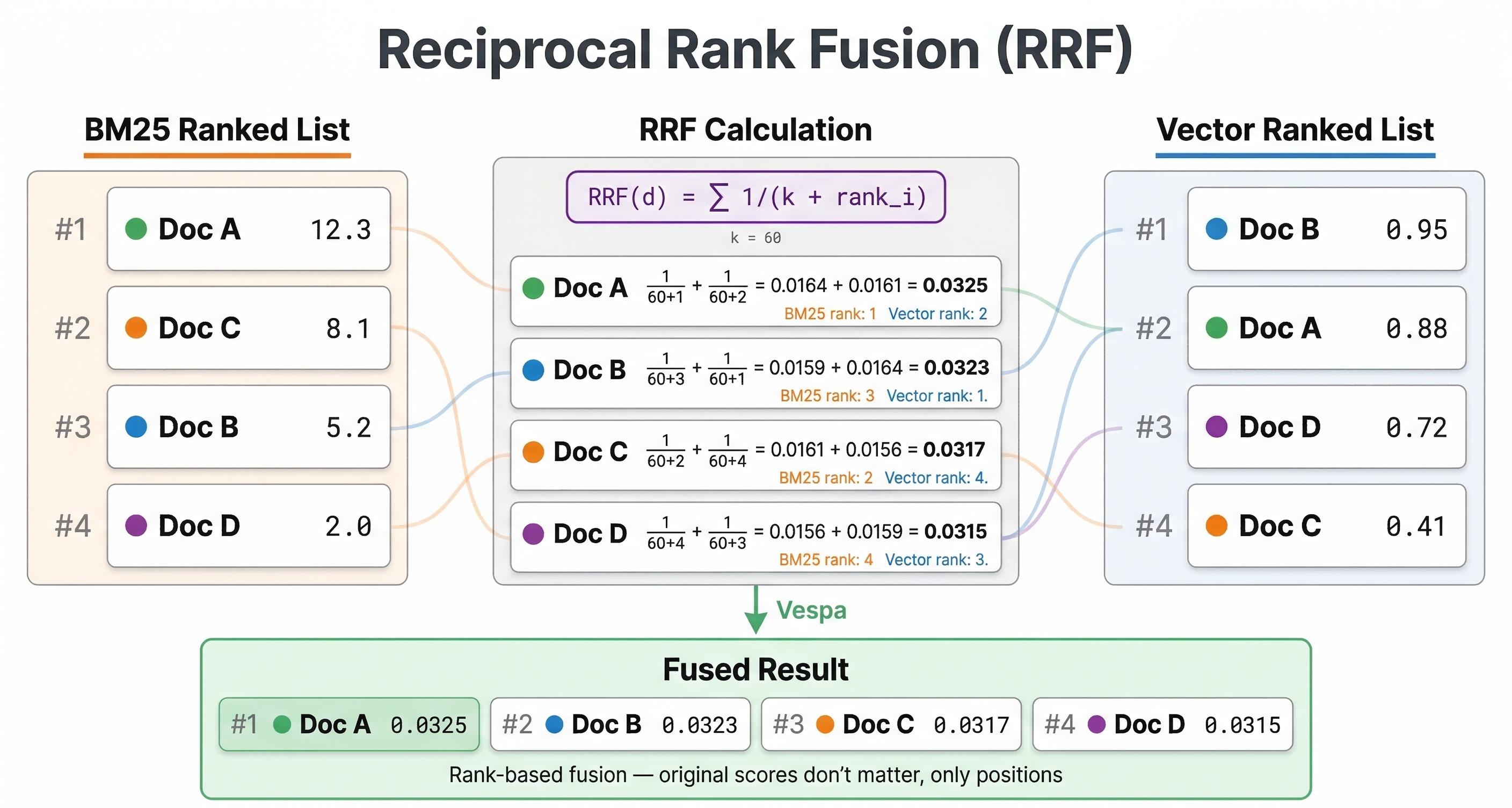
Reciprocal Rank Fusion (RRF) is a popular hybrid search technique that combines rankings from different sources. Instead of combining scores directly, RRF combines ranks.
The RRF score for a document is:
RRF = sum(1 / (k + rank_in_method_i))
Where rank_in_method_i is the document's rank from each search method (text search, vector search, etc.) and k is a constant (typically 60) that controls the fusion behavior.
Documents that rank highly in multiple methods get high RRF scores. Documents that rank poorly in any method get penalized. This approach does not require normalizing scores from different methods.
Vespa provides RRF as a built-in function:
rank-profile rrf {
  inputs {
    query(q_embedding) tensor<float>(x[384])
  }
  function text_score() {
    expression: bm25(title) + bm25(body)
  }
  first-phase {
    expression: closeness(field, embedding)
  }
  global-phase {
    expression {
      reciprocal_rank_fusion(text_score, closeness(field, embedding))
    }
    rerank-count: 100
  }
}
Each argument to reciprocal_rank_fusion must be a single rank-feature or the name of a function — not an inline expression — so we wrap the BM25 sum in a text_score function and reference that.
The reciprocal_rank_fusion() function can only be used in global-phase ranking because it operates on ranks across all hits, which requires a global view of results. The rerank-count controls how many top candidates from the first phase are reranked using RRF. This is often more robust than weighted combinations because it does not require tuning weights.
Multi-Phase Hybrid Ranking
For expensive ranking, use multi-phase ranking where text or vectors filter in first phase, and both contribute in second phase:
rank-profile hybrid_two_phase {
  inputs {
    query(q_embedding) tensor<float>(x[384])
  }
  first-phase {
    expression: bm25(title) + bm25(body)
  }
  second-phase {
    expression {
      bm25(title) * 2 +
      bm25(body) +
      closeness(field, embedding) * 100 +
      attribute(popularity) * 5
    }
    rerank-count: 100
  }
}
The first phase uses fast text search to get initial candidates. The second phase applies vector similarity and other signals to rerank the top 100. This keeps latency low while using vectors where they matter most.
Hybrid Search with Filters
Combining hybrid search with filters is where Vespa's unified architecture shines:
select * from doc where
  (userInput(@query) or
   ({targetHits: 10}nearestNeighbor(embedding, query_embedding))) and
  publish_date > 1640000000 and
  category contains "technology"
This finds documents matching text or vector similarity, but only among recent technology articles. The filters apply efficiently to both retrieval methods.
You can also use query-time features for dynamic control:
rank-profile adaptive_hybrid {
  inputs {
    query(q_embedding) tensor<float>(x[384])
    query(text_weight) double: 0.5
    query(vector_weight) double: 0.5
  }
  first-phase {
    expression {
      (bm25(title) + bm25(body)) * query(text_weight) +
      closeness(field, embedding) * query(vector_weight)
    }
  }
}
Pass different weights per query to adjust the hybrid balance based on query type, user preferences, or A/B test variants.
How Filtering Affects Vector Search
When you combine filters with nearestNeighbor, Vespa uses one of two strategies to handle the interaction between filtering and HNSW graph traversal. Understanding these strategies helps you predict performance and tune behavior when needed.
Pre-filtering (default)
Vespa applies the filter first, then searches the HNSW graph only among documents that passed the filter. This guarantees that all results match your filter conditions.
There is a catch. If the filter is very selective (few documents pass), the HNSW graph becomes too sparse to navigate efficiently. In that case, Vespa falls back to exact nearest neighbor search, scanning all matching documents rather than using the graph. The approximate-threshold parameter controls this behavior: if the estimated fraction of matching documents falls below this threshold, Vespa switches to exact search. The default is 0.05 (5%).
For example, if you filter by a rare category that covers only 1% of your documents, pre-filtering will likely trigger exact search. This is slower but guarantees accurate results. If you filter by a common attribute covering 80% of documents, pre-filtering stays efficient because enough of the HNSW graph remains reachable.
Post-filtering
With post-filtering, Vespa searches the HNSW graph first (ignoring the filter), then removes results that don't match the filter. This is faster when the filter matches most documents, since the full graph is available for traversal. You can set post-filter-threshold in your rank profile to enable this mode when a large fraction of documents match.
Configuration
You can tune these thresholds in your rank profile:
rank-profile filtered_hybrid {
  inputs {
    query(q_embedding) tensor<float>(x[384])
  }
  approximate-threshold: 0.05
  first-phase {
    expression: closeness(field, embedding)
  }
}
The approximate-threshold controls when Vespa gives up on approximate search and falls back to exact search. Lower values mean Vespa tolerates sparser graphs before switching.
Practical guidance
For most applications, the defaults work well. You should only tune these thresholds if you see unexpected latency on filtered vector queries. The symptoms to watch for: queries with selective filters suddenly taking much longer than unfiltered queries (because exact search kicked in), or queries with broad filters returning fewer results than expected (because post-filtering removed too many candidates).
If your application frequently combines vector search with highly selective filters, consider whether you truly need vector search for those queries. A filtered text search might be more efficient and equally effective.
When to Use Each Component
For name or identifier queries ("iPhone 15", "GPT-4"), rely heavily on text search. Users expect exact matches.
For conceptual or question queries ("how to fix slow computer"), rely more on vector search. Semantic understanding matters more than exact words.
For most queries, balanced hybrid search works well. The combination handles both precision and recall.
Use multi-phase ranking when vector or ML model evaluation is expensive. Let text search do heavy lifting in first phase.
Measuring Hybrid Search Quality
Evaluate hybrid search quality with relevance metrics like NDCG, MAP, or MRR using test queries with human relevance judgments. Compare pure text, pure vector, and hybrid results.
Run A/B tests in production. Measure click-through rate, conversion, or other success metrics for different hybrid configurations.
Analyze failures. Look at queries where hybrid does worse than pure text or vector. This helps identify when to adjust weights or ranking logic.
Tuning Hybrid Search
Start with RRF. It works well without tuning and is robust across different query types.
If you prefer weighted combination, start with equal weights and adjust based on evaluation. Text weight higher for precision-focused applications. Vector weight higher for exploratory search.
Use query features to adapt weights dynamically. Different query types may need different balances.
Consider query length. Short queries ("python") might benefit from more text weight. Longer queries ("how to debug memory leaks in python applications") might benefit from more vector weight because they provide better semantic context.
RRF vs Linear Combination
You have seen two main approaches for combining text and vector signals: Reciprocal Rank Fusion (RRF) and linear combination of scores. Each has tradeoffs worth understanding before you pick one.
When RRF works well
RRF combines ranks, not scores. This means you don't need to worry about normalizing BM25 and closeness scores to the same scale. It just works.
RRF is especially robust when your text and vector score distributions differ wildly. BM25 scores might range from 0 to 25 for one query and 0 to 3 for another, while closeness is always between 0 and 1. RRF ignores these differences entirely because it only looks at relative ordering. It does not require tuning weights, making it a reliable default.
The downside is that RRF ignores score magnitude. A document that barely matches the text query and a document that perfectly matches it get treated similarly if they happen to share the same rank position. The k parameter (default 60) can theoretically be tuned to adjust how much rank position matters, but in practice it rarely makes a meaningful difference.
When linear combination works better
A linear combination preserves score magnitude. A strong text match scores higher than a weak one, and you can express domain knowledge about relative signal importance through weights. If you know that text relevance matters twice as much as semantic similarity for your use case, you can set weights accordingly.
The catch is that BM25 and closeness scores live on completely different scales. Without normalization, one signal can easily dominate the other. You need to bring both scores into the same range before combining them.
Vespa provides normalize_linear() in global-phase ranking to handle this. It maps scores to the [0,1] range across the candidate set:
rank-profile normalized_hybrid {
  inputs {
    query(q_embedding) tensor<float>(x[384])
  }
  function text_score() {
    expression: bm25(title) + bm25(body)
  }
  function vector_score() {
    expression: closeness(field, embedding)
  }
  first-phase {
    expression: closeness(field, embedding)
  }
  global-phase {
    expression {
      normalize_linear(text_score) * 0.6 +
      normalize_linear(vector_score) * 0.4
    }
    rerank-count: 100
  }
}
The normalize_linear() function looks at the minimum and maximum scores across the reranked candidates and scales everything to [0,1]. Note that each argument to normalize_linear (and reciprocal_rank) must be a single rank-feature or function name — wrap any compound expression in a function first, as we do for text_score here. The weights (0.6 and 0.4) then behave as you'd expect across the normalized signals.
Which one should you pick?
Start with RRF. It requires no tuning and handles most cases well. Move to a normalized linear combination if your evaluation metrics show that score magnitude matters for your queries, or if you need finer control over the balance between signals. The extra complexity of normalization and weight tuning is only worth it when you have the evaluation data to guide those decisions.
Best Practices
Generate query embeddings with the same model used for documents. Mismatched models produce poor vector search results.
Normalize scores or use RRF to avoid one signal dominating. Raw BM25 scores and cosine similarities have different ranges.
Test hybrid search on representative queries. What works for one dataset or domain may not work for another.
Monitor both text and vector search effectiveness separately. If vector search never affects results, your embeddings or weights may need adjustment.
Use appropriate targetHits for nearestNeighbor. Too low and you miss relevant vectors. Too high and you waste computation.
Next Steps
You now understand hybrid search strategies for combining text and vector retrieval. The next chapter is a lab where you will build a hybrid search application and compare different ranking approaches.
For more on hybrid search, see the hybrid search guide and RRF documentation.