Lab - Hybrid Search
In this lab you will add an embedding field powered by Vespa's built-in embedder, run nearest neighbor queries, and build a hybrid rank profile that combines BM25 and vector search with reciprocal rank fusion.
Prerequisites
Your Vespa container should be running with the application from Lab 4 (20 products, rank profiles, query profiles).
Download the Embedding Model
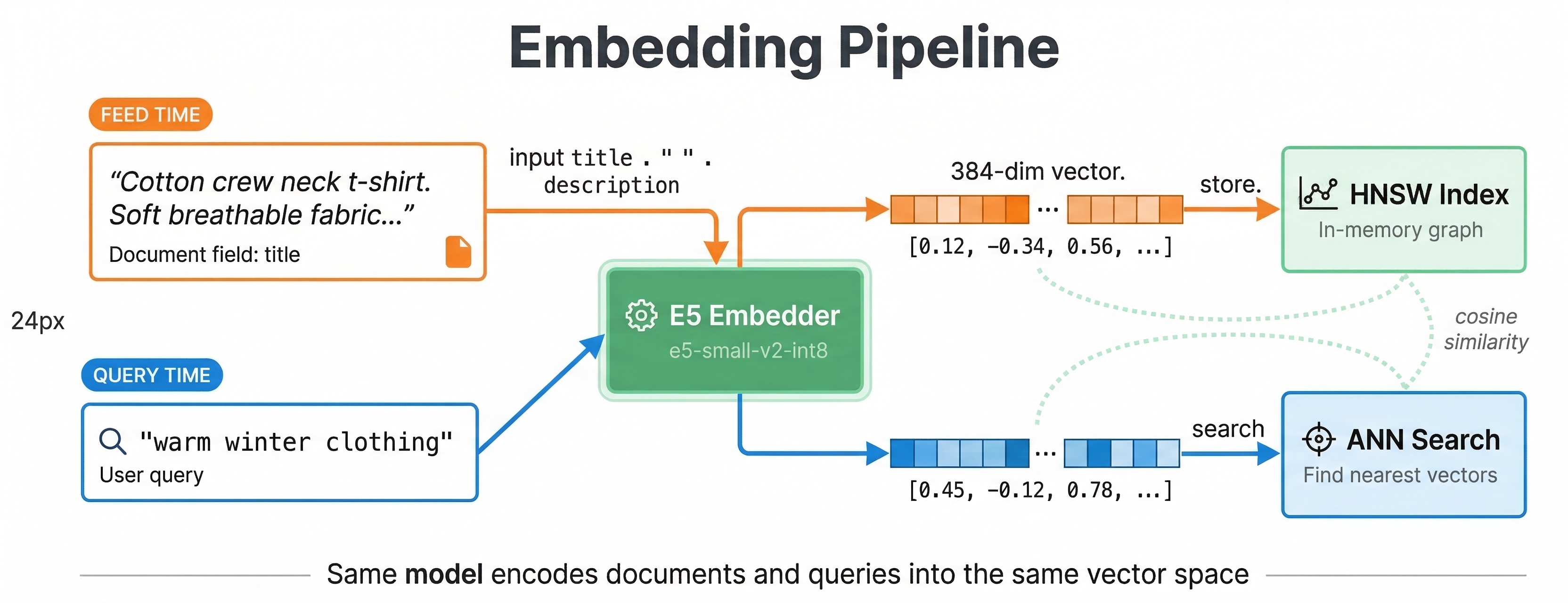
We will use the E5-small-v2 text embedding model. It produces 384-dimensional vectors and runs efficiently on CPU.
Download the ONNX model and tokenizer into your application package:
mkdir -p ecommerce-app/model

curl -L -o ecommerce-app/model/e5-small-v2-int8.onnx \
  https://github.com/vespa-engine/sample-apps/raw/master/examples/model-exporting/model/e5-small-v2-int8.onnx

curl -L -o ecommerce-app/model/tokenizer.json \
  https://raw.githubusercontent.com/vespa-engine/sample-apps/master/examples/model-exporting/model/tokenizer.json
Configure the Embedder
Open ecommerce-app/services.xml and add the embedder component inside the <container> element, before <search/>:
<?xml version="1.0" encoding="UTF-8"?>
<services version="1.0">
  <container id="default" version="1.0">
    <component id="e5" type="hugging-face-embedder">
      <transformer-model path="model/e5-small-v2-int8.onnx"/>
      <tokenizer-model path="model/tokenizer.json"/>
    </component>
    <search/>
    <document-api/>
  </container>

  <content id="content" version="1.0">
    <min-redundancy>1</min-redundancy>
    <documents>
      <document type="product" mode="index"/>
    </documents>
    <nodes>
      <node distribution-key="0" hostalias="node1"/>
    </nodes>
  </content>
</services>
The hugging-face-embedder component loads the ONNX model at startup and makes it available for both indexing and querying.
Add the Embedding Field
Open ecommerce-app/schemas/product.sd and add an embedding field after the document block but before the fieldset:
  field embedding type tensor<float>(x[384]) {
    indexing: input title . " " . input description | embed e5 | attribute | index
    attribute {
      distance-metric: angular
    }
  }
This is a synthetic field (outside the document block). The indexing expression concatenates title and description, passes the text through the e5 embedder, and stores the result as both an attribute and an HNSW index.
Add Vector and Hybrid Rank Profiles
Add these rank profiles after the existing ecommerce profile:
  rank-profile semantic {
    inputs {
      query(q_embedding) tensor<float>(x[384])
    }
    first-phase {
      expression: closeness(field, embedding)
    }
    match-features {
      closeness(field, embedding)
    }
  }

  rank-profile hybrid inherits semantic {
    function bm25_score() {
      expression: bm25(title) * 2 + bm25(description)
    }

    first-phase {
      expression: bm25_score + closeness(field, embedding) * 5
    }

    global-phase {
      expression: reciprocal_rank_fusion(bm25_score, closeness(field, embedding))
      rerank-count: 100
    }

    match-features {
      bm25(title)
      bm25(description)
      closeness(field, embedding)
    }
  }
The semantic profile ranks purely by vector similarity. The hybrid profile uses a linear combination in the first phase for initial scoring, then applies reciprocal rank fusion in the global phase to merge the BM25 and vector signals.
Deploy and Re-feed
vespa deploy --wait 300 ecommerce-app
The embedder model takes a moment to load. Once deployed, re-feed your data so Vespa generates embeddings for each document:
vespa feed feed-extended.jsonl
During feeding, Vespa runs each document's title and description through the E5 model and stores the resulting vector. This takes a few seconds for 20 documents.
Run Vector Queries
Pure semantic search
Search by meaning rather than keywords. The embed() function in YQL runs the query text through the same E5 model:
vespa query 'yql=select * from product where {targetHits:5}nearestNeighbor(embedding, q_embedding)' \
  'input.query(q_embedding)=embed(e5, "warm clothing for winter")' \
  'ranking=semantic'
This finds products semantically similar to "warm clothing for winter" even if they do not contain those exact words. The wool overcoat and fleece hoodie rank near the top:
{
    "root": {
        "fields": { "totalCount": 5 },
        "children": [
            {
                "id": "id:product:product::11",
                "relevance": 0.6354980354550203,
                "fields": {
                    "title": "Fleece zip hoodie",
                    "matchfeatures": { "closeness(field,embedding)": 0.6354980354550203 }
                }
            },
            {
                "id": "id:product:product::6",
                "relevance": 0.6347020548843818,
                "fields": {
                    "title": "Wool blend overcoat",
                    "matchfeatures": { "closeness(field,embedding)": 0.6347020548843818 }
                }
            }
        ]
    }
}
Note that none of the matching documents contain the literal words "warm" or "winter" in their titles - the embedder maps the query and document text into a shared semantic space.
Compare with lexical search
vespa query "select * from product where default contains 'warm clothing for winter'" \
  "ranking=text_only"
Lexical search may find fewer results because it requires exact word matches. Semantic search understands that a "fleece hoodie" and "wool overcoat" are relevant to "warm winter clothing."
Hybrid search
Combine both approaches. Use the rank() operator to run BM25 and nearest neighbor together:
vespa query 'yql=select * from product where rank({targetHits:10}nearestNeighbor(embedding, q_embedding), default contains "jacket")' \
  'input.query(q_embedding)=embed(e5, "jacket")' \
  'ranking=hybrid'
This retrieves candidates from both the HNSW index and the text index, then the hybrid profile scores them using RRF. Check the matchfeatures to see how BM25 and closeness contributed to each result.
Semantic search with a filter
Nearest neighbor search works with filters. Find products similar to "comfortable everyday shoes" but only in the Shoes category:
vespa query 'yql=select * from product where {targetHits:5}nearestNeighbor(embedding, q_embedding) and category contains "Shoes"' \
  'input.query(q_embedding)=embed(e5, "comfortable everyday shoes")' \
  'ranking=semantic'
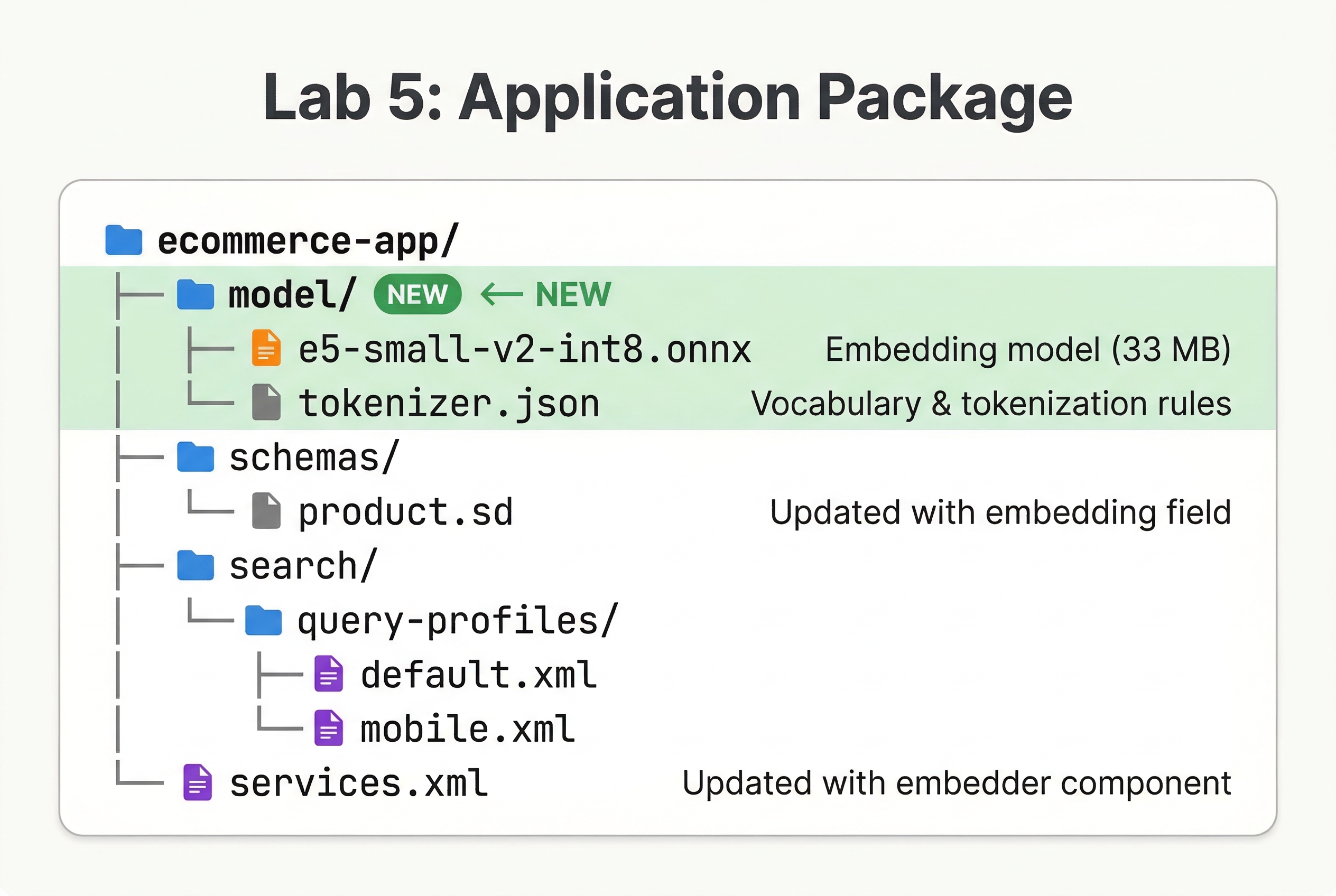
Review Your Application Package
Your package should now look like this:
ecommerce-app/
├── model/
│   ├── e5-small-v2-int8.onnx
│   └── tokenizer.json
├── schemas/
│   └── product.sd
├── search/
│   └── query-profiles/
│       ├── default.xml
│       └── mobile.xml
└── services.xml
Checkpoint
Run this query and verify:
vespa query 'yql=select * from product where {targetHits:5}nearestNeighbor(embedding, q_embedding)' \
  'input.query(q_embedding)=embed(e5, "outdoor hiking gear")' \
  'ranking=semantic' \
  'hits=3'
You should see results related to outdoor activities even though the query "outdoor hiking gear" does not exactly match any product title:
{
    "root": {
        "fields": { "totalCount": 5 },
        "children": [
            { "id": "id:product:product::4",  "relevance": 0.6444599847579316, "fields": { "title": "Waterproof hiking jacket" } },
            { "id": "id:product:product::19", "relevance": 0.6426540870670359, "fields": { "title": "Trail running shoes" } },
            { "id": "id:product:product::14", "relevance": 0.6292353639228644, "fields": { "title": "Packable rain jacket" } }
        ]
    }
}
Each hit has a matchfeatures object with closeness(field, embedding) values matching the relevance score, which is how the semantic profile ranks: it uses closeness(field, embedding) directly as the first-phase expression.
What You Built
Your application now has:
- A built-in E5 text embedding model that generates vectors at both feed and query time
- An HNSW index for fast approximate nearest neighbor search
- A
semanticrank profile for pure vector search - A
hybridrank profile combining BM25 and vector similarity with reciprocal rank fusion - The ability to filter vector search results by attributes
In the next lab, you will add multi-phase reranking with a machine learning model.