Rank Profiles
Ranking is what separates a great search experience from a mediocre one. Users expect the most relevant results first, and relevance depends on your specific use case. Vespa's rank profiles let you define exactly how documents should be scored and ordered. In this chapter, we explore what rank profiles are, how they work, and how to create custom ranking logic that combines multiple signals.
What is a Rank Profile
A rank profile is a named collection of ranking logic defined in your schema. It specifies how to compute a relevance score for each document that matches a query. The score determines the order in which results are returned, with higher scores appearing first.
When you run a query, you can specify which rank profile to use. Different profiles can implement different ranking strategies for different query types or user contexts. You might have one profile for text relevance, another for personalization, and another for promoting recent content.
A simple rank profile looks like this:
rank-profile simple {
  first-phase {
    expression: bm25(title)
  }
}
This profile scores documents based on BM25 text relevance for the title field. To use it in a query, you add ranking=simple as a parameter.
Default Ranking Behavior
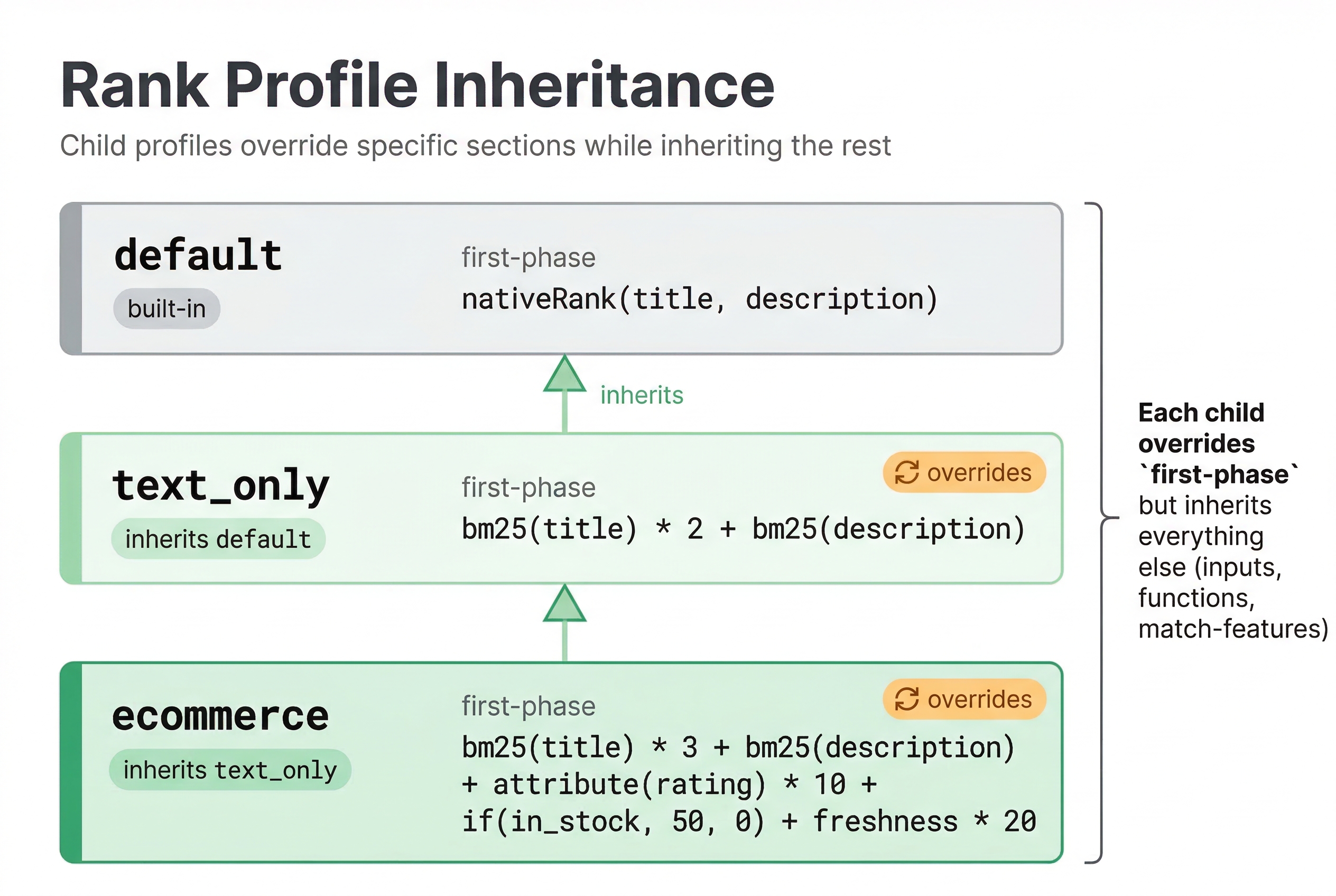
Every schema has a default rank profile even if you do not define one explicitly. The default profile uses the nativeRank function, which combines text matching signals with term frequency and field proximity. This works reasonably well for simple text search but often is not optimal for specific use cases.
When you do not specify a ranking parameter in your query, Vespa uses the default profile. You can override the default profile by defining your own:
rank-profile default {
  first-phase {
    expression: bm25(title) + bm25(body)
  }
}
Now queries without an explicit ranking parameter use your custom default logic instead of nativeRank.
Creating Custom Rank Profiles
Custom rank profiles let you implement ranking logic specific to your application. You define them in your schema after the document definition.
Here is a profile that combines text relevance with a popularity signal:
rank-profile popular_first {
  first-phase {
    expression: bm25(title) + attribute(popularity) * 10
  }
}
The attribute(popularity) function retrieves the popularity field value. We multiply by 10 to give popularity significant weight relative to text relevance. The exact weights depend on your data and what balance you want between relevance and popularity.
You can use any mathematical expression in ranking. Addition, multiplication, division, if statements, and functions are all supported:
rank-profile complex {
  first-phase {
    expression: if(attribute(in_stock), bm25(title) * 2, bm25(title) * 0.5)
  }
}
This profile doubles the score for in-stock items and halves it for out-of-stock items.
Combining Multiple Signals
Real ranking often combines many signals. Text relevance, recency, popularity, user preferences, business rules, and more all contribute to the final score. Vespa makes it straightforward to combine these signals in a ranking expression.
Here is a profile combining text, freshness, and popularity:
rank-profile multi_signal {
  first-phase {
    expression {
      bm25(title) * 2 +
      freshness(publish_date) * 100 +
      attribute(popularity) * 5
    }
  }
}
The freshness() function returns a score between 0 and 1 based on how recent a timestamp field is. Recent documents get scores close to 1, older documents get lower scores. The function normalizes by the half-life configured in your schema.
The weights (2, 100, 5) determine the relative importance of each signal. Finding the right weights often requires experimentation and evaluation with real queries and relevance judgments.
Multi-Phase Ranking
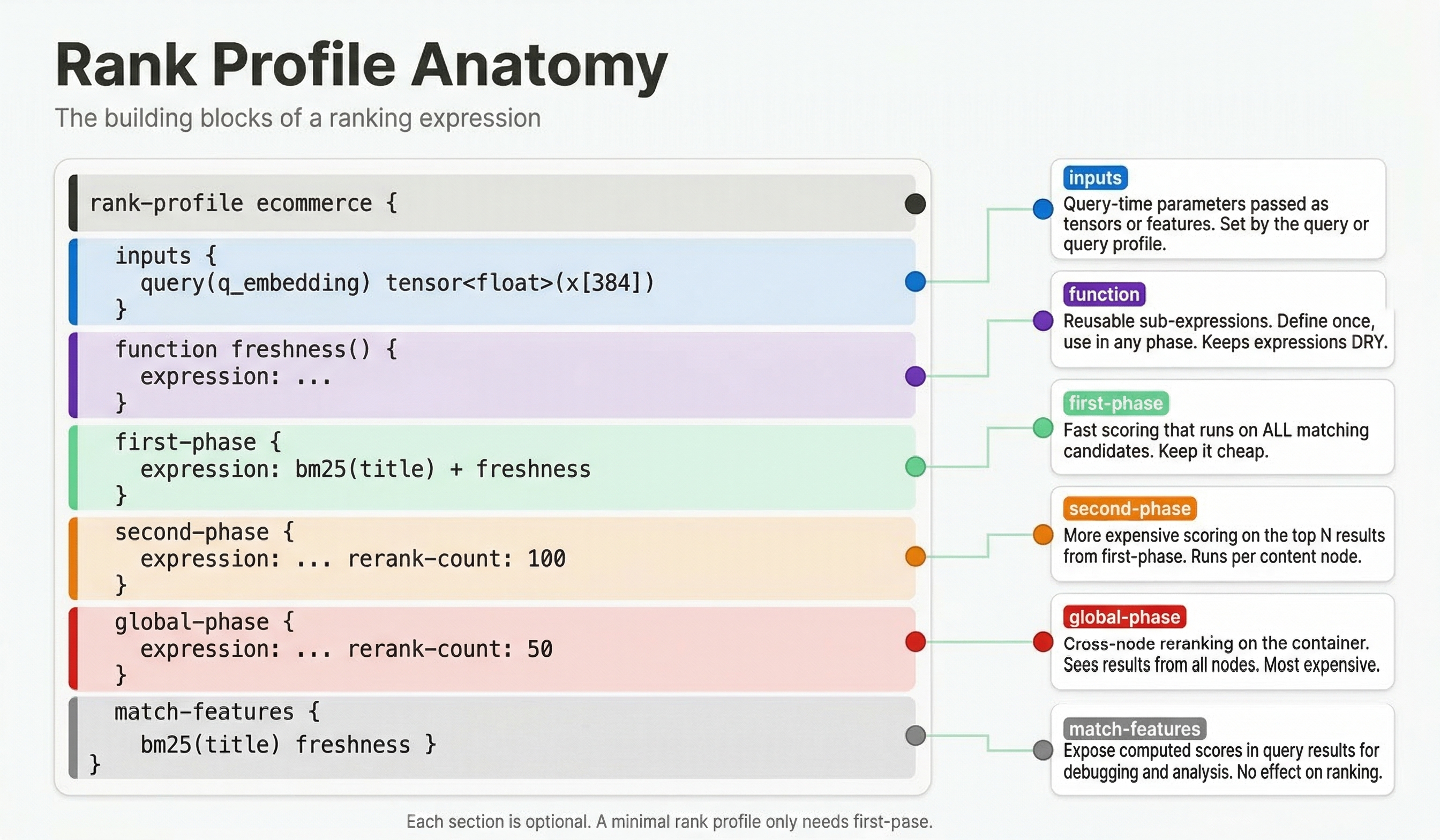
For expensive ranking functions like neural network models, evaluating every matching document would be too slow. Multi-phase ranking solves this by using a cheap first-phase function to eliminate poor candidates, then applying an expensive second-phase function to only the top candidates.
rank-profile two_phase {
  onnx-model my_model {
    file: models/my_model.onnx
  }

  first-phase {
    expression: bm25(title) + attribute(popularity)
  }

  second-phase {
    expression: sum(onnx(my_model).output)
    rerank-count: 100
  }
}
The onnx-model block declares the model and maps it to a file. The first phase runs on all matches using a fast expression. The second phase runs only on the top 100 documents per content node, applying the neural network model via onnx(my_model).output. The rerank-count controls how many first-phase results get reranked.
This approach keeps latency low while allowing sophisticated ranking for top results. You can even add a third global-phase that runs on the globally merged top results from all content nodes.
Inheriting Rank Profiles
Rank profiles can inherit from other profiles to avoid repetition:
rank-profile base {
  first-phase {
    expression: bm25(title) + bm25(body)
  }
}

rank-profile base_with_popularity inherits base {
  first-phase {
    expression: bm25(title) + bm25(body) + attribute(popularity) * 10
  }
}
The child profile extends the base. You can override phases or add new configuration while keeping parts of the parent.
Using Constants and Functions
For complex ranking, you can define constants and functions to make expressions more readable:
rank-profile readable {
  constants {
    text_weight: 2.0
    popularity_weight: 10.0
  }

  function text_score() {
    expression: bm25(title) + bm25(body)
  }

  first-phase {
    expression: text_score() * text_weight + attribute(popularity) * popularity_weight
  }
}
Constants make it easy to tune weights without changing the expression structure. Functions let you break complex logic into understandable pieces and reuse calculations.
Rank Features
Ranking expressions use rank features, which are values computed by Vespa from the query and document. We have already seen bm25(), attribute(), and freshness(). Many more features are available.
fieldMatch(field) provides detailed text matching scores considering term order, proximity, and coverage. closeness(dimension, field) gives vector similarity for nearest neighbor searches. query(name) retrieves query features you pass as parameters. now() gives the current timestamp for time-based logic.
You can see all available features in the Vespa documentation. The key is that features capture different aspects of relevance, and your ranking expression combines them appropriately for your use case.
Inspecting Rank Features
When tuning a rank profile, you need to see what each feature contributes to the final score. Vespa provides two ways to include feature values in query results.
match-features lists features whose values are returned with every hit:
rank-profile debug_example {
  first-phase {
    expression: bm25(title) * 2 + attribute(popularity)
  }
  match-features {
    bm25(title)
    attribute(popularity)
  }
}
Each result hit now includes a matchfeatures object with the raw values of bm25(title) and attribute(popularity). This tells you exactly why one document scored higher than another.
summary-features works the same way but the values appear in the summaryfeatures field of the result. The difference is that match-features values are available during ranking (including global-phase), while summary-features values are computed only when producing the final result. For debugging, match-features is usually what you want.
You can also list named functions:
rank-profile explainable {
  function text_score() {
    expression: bm25(title) * 2 + bm25(body)
  }

  first-phase {
    expression: text_score + attribute(popularity) * 5
  }

  match-features {
    text_score
    attribute(popularity)
  }
}
This returns both the combined text_score and the raw popularity value, making it easy to understand the ranking breakdown.
Testing Ranking Changes
When you change a rank profile, test it before deploying to production. Use match-features to compare feature values between old and new profiles on the same queries. Look at specific examples where ranking changed and verify the changes make sense.
Ideally, have a test set of queries with relevance judgments and measure ranking quality with metrics like NDCG or MRR. This quantifies whether changes improve ranking objectively.
Best Practices
Start simple and add complexity as needed. Begin with basic text relevance, then add one signal at a time. Test each addition to see if it improves results.
Name profiles descriptively. Names like text_only, with_popularity, or personalized make it clear what each profile does.
Document your ranking logic. Comments in schemas help, but external documentation explaining the reasoning behind weights and signals is valuable for future maintainers.
Use multi-phase ranking for expensive functions. Do not evaluate neural networks on all matches unless you have very few matches or very fast models.
Monitor ranking in production. Track metrics like click-through rate, conversion rate, or user satisfaction by ranking profile. This tells you which profiles work best in practice.
Next Steps
You now understand rank profiles and how to create custom ranking logic. The next chapter explores built-in ranking functions like BM25 in detail, explaining what they compute and when to use them.
For complete details on ranking, see the Vespa ranking guide and phased ranking documentation.