Lab - Ranking and Facets
In this lab you will add multi-signal rank profiles that combine text relevance with business metrics, use match-features to understand scoring, and build grouping queries for faceted navigation.
Prerequisites
Your Vespa instance should be running with the application package and 20 products from Lab 3.
Add Rank Profiles
Open ecommerce-app/schemas/product.sd. Replace the existing rank-profile default block and add two new profiles. Place all rank profiles after the document-summary short block:
  rank-profile default {
    first-phase {
      expression: nativeRank(title, description)
    }
  }

  rank-profile text_only {
    first-phase {
      expression: bm25(title) * 2 + bm25(description)
    }
    match-features {
      bm25(title)
      bm25(description)
    }
  }

  rank-profile ecommerce {
    first-phase {
      expression {
        bm25(title) * 3 +
        bm25(description) +
        attribute(rating) * 10 +
        if(attribute(in_stock), 50, 0) +
        freshness(updated_at) * 20
      }
    }
    match-features {
      bm25(title)
      bm25(description)
      attribute(rating)
      attribute(in_stock)
      freshness(updated_at)
    }
  }
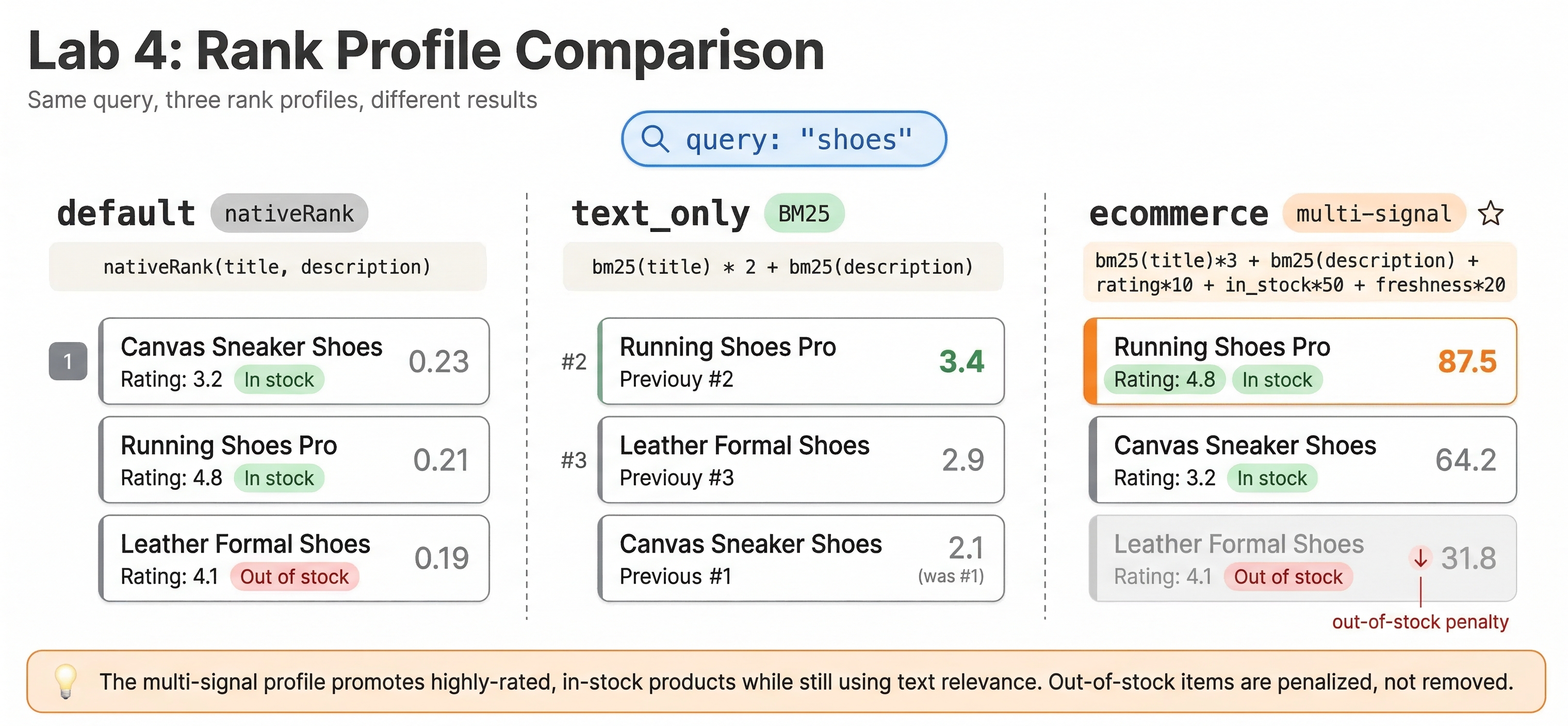
Three profiles, each more sophisticated:
defaultuses nativeRank, the basic text relevance functiontext_onlyuses BM25 with title weighted 2x over description, plusmatch-featuresso you can see the raw scoresecommercecombines BM25 text relevance, product rating, an in-stock boost, and a freshness signal. Products that are in stock, highly rated, and recently updated rank higher
Redeploy
vespa deploy --wait 300 ecommerce-app
Compare Rank Profiles
Search for "shoes" with the default profile:
vespa query "select * from product where default contains 'shoes'" "ranking=default"
Now with the text-only BM25 profile:
vespa query "select * from product where default contains 'shoes'" "ranking=text_only"
Look at the matchfeatures object in each hit. You can see exactly how much bm25(title) and bm25(description) contributed. The running shoes, trail running shoes, and canvas sneakers should all appear, but their ordering may differ.
Now with the e-commerce profile:
vespa query "select * from product where default contains 'shoes'" "ranking=ecommerce"
Notice how the scores are much higher because of the rating, in-stock, and freshness bonuses. The trail running shoes (out of stock, in_stock = false) should rank lower than the others because it misses the 50-point in-stock boost.
Inspect Match Features
Run a query and look at the matchfeatures field in the JSON response:
vespa query "select * from product where default contains 'jacket'" "ranking=ecommerce"
For each hit, you will see something like:
"matchfeatures": {
  "attribute(in_stock)": 1.0,
  "attribute(rating)": 4.800000190734863,
  "bm25(description)": 1.1359450610051194,
  "bm25(title)": 1.2455097942521527,
  "freshness(updated_at)": 0.0
}
This tells you exactly why one jacket ranked above another. The hiking jacket (rating 4.8) outranks the denim jacket (rating 4.4) by roughly (4.8 - 4.4) * 10 = 4 points, which matches the relevance gap you'll see in the response. The freshness(updated_at) is 0.0 here because the hardcoded updated_at timestamps in the dataset are months in the past, beyond the default freshness window.
Add Grouping Queries
Grouping gives you faceted navigation. Try these queries:
Category facets
vespa query "select * from product where true" \
  "ranking=ecommerce" \
  | all(group(category) order(-count()) each(output(count())))
Wait, grouping uses YQL syntax. Here is the correct form:
vespa query 'yql=select * from product where true | all(group(category) order(-count()) each(output(count())))' \
  "ranking=ecommerce"
This shows how many products exist in each category. You should see counts like Tops: 4, Bottoms: 4, Shoes: 4, Outerwear: 4, Accessories: 4. The grouping output is appended after the regular hits as a grouplist:
{
    "id": "grouplist:category",
    "label": "category",
    "children": [
        { "value": "Accessories", "fields": { "count()": 4 } },
        { "value": "Outerwear",   "fields": { "count()": 4 } },
        { "value": "Shoes",       "fields": { "count()": 4 } },
        { "value": "Bottoms",     "fields": { "count()": 4 } },
        { "value": "Tops",        "fields": { "count()": 4 } }
    ]
}
Brand facets
vespa query 'yql=select * from product where true | all(group(brand) order(-count()) each(output(count())))' \
  "ranking=ecommerce"
Price range buckets
vespa query 'yql=select * from product where true | all(group(price / 50) each(output(count())))' \
  "ranking=ecommerce"
This groups products into $50 price buckets. A product at $79 goes into bucket 1 (79/50 = 1), a product at $189 goes into bucket 3.
Average rating by category
vespa query 'yql=select * from product where true | all(group(category) each(output(avg(attribute(rating)))))' \
  "ranking=ecommerce"
Multiple facets in one query
vespa query 'yql=select * from product where default contains "shoes" | all(group(brand) each(output(count()))) | all(group(color) each(output(count())))' \
  "ranking=ecommerce"
This returns both brand and color facets for the "shoes" query in a single request.
Checkpoint
Run this query:
vespa query "select * from product where default contains 'jacket'" "ranking=ecommerce" "hits=3"
Verify that:
- You see 3 or more matching jackets (hiking, denim, rain, overcoat may match depending on descriptions)
- Each hit has a
matchfeaturesobject with all 5 features - In-stock jackets rank higher than out-of-stock ones
What You Built
Your application now has:
- Three rank profiles: basic nativeRank, BM25 text-only, and a multi-signal e-commerce profile
match-featuresfor ranking transparency and debugging- Grouping queries for category, brand, and price range facets
In the next lab, you will add vector search with embeddings and build a hybrid retrieval pipeline.