Built-in Ranking Functions
Vespa provides many built-in ranking functions that capture different aspects of relevance. Understanding these functions helps you build effective ranking profiles without implementing everything from scratch. In this chapter, we explore the most important built-in functions, what they compute, and when to use them.
BM25
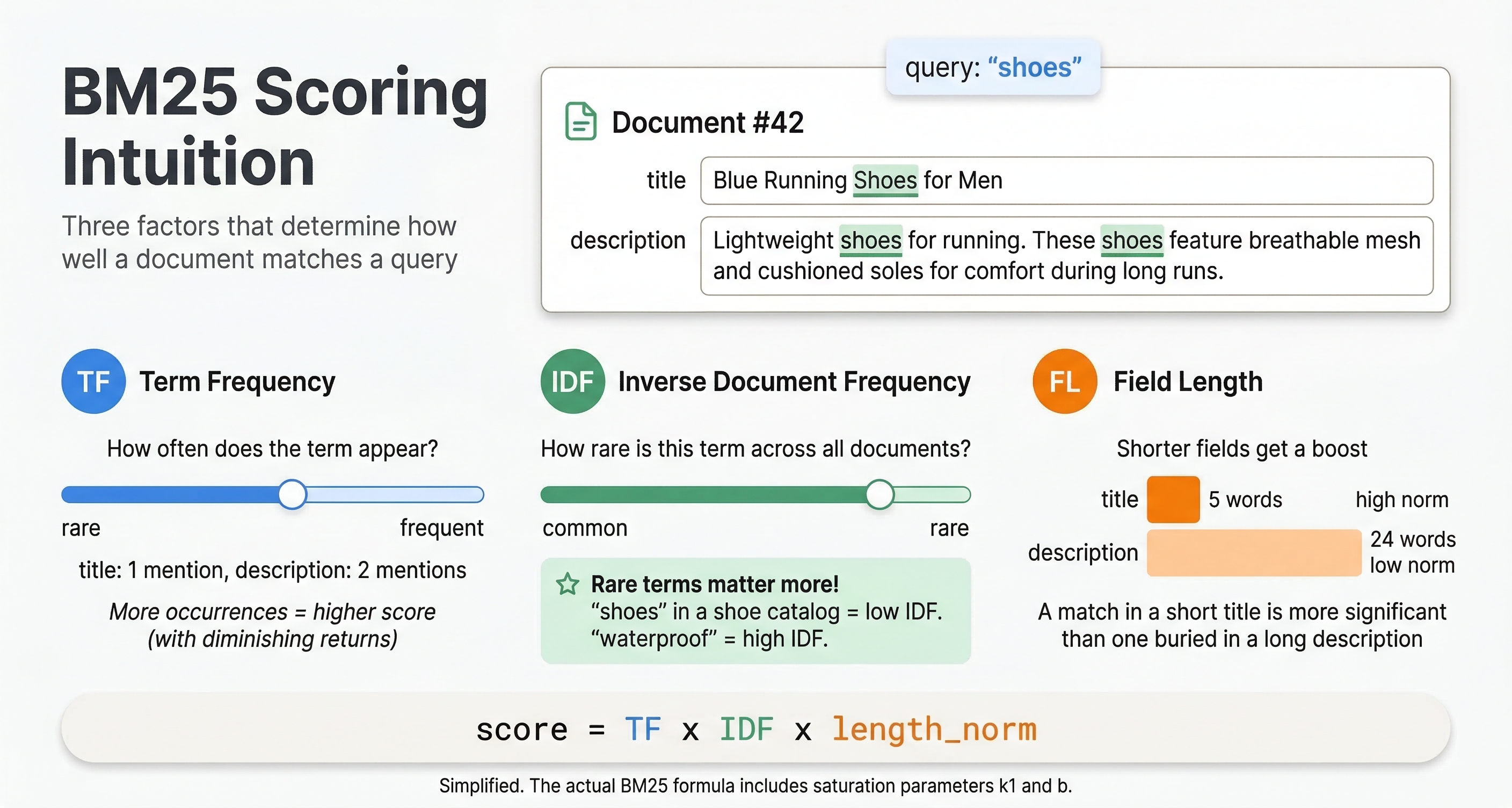
BM25 (Best Matching 25) is a widely-used text relevance algorithm. It scores documents based on term frequency, document length, and term rarity. Documents containing query terms frequently score higher, but the function includes saturation to prevent very long documents from dominating just because they repeat terms many times.
To use BM25 in Vespa, first enable it on your text fields in the schema:
field title type string {
  indexing: summary | index
  index: enable-bm25
}
Then use the bm25(field) function in your ranking expression:
rank-profile bm25_ranking {
  first-phase {
    expression: bm25(title) + bm25(body)
  }
}
This scores documents by BM25 on both title and body fields. You can weight fields differently:
expression: bm25(title) * 2 + bm25(body)
This gives title matches twice the weight of body matches. BM25 is a strong baseline for text search and often performs well without tuning. The algorithm handles term frequency, inverse document frequency, and document length normalization automatically.
nativeRank
The nativeRank function is Vespa's legacy text relevance algorithm. It combines multiple signals including term frequency, field matching quality, term proximity, and term significance. While BM25 has largely replaced nativeRank for text relevance, you may encounter it in older applications.
rank-profile native {
  first-phase {
    expression: nativeRank(title, body)
  }
}
nativeRank considers all listed fields together. It computes per-field scores and combines them with configurable weights.
For new applications, prefer BM25 unless you have specific reasons to use nativeRank. BM25 is simpler, more standardized, and typically performs as well or better.
fieldMatch
The fieldMatch(field) function provides detailed text matching scores. Unlike BM25 which focuses on term statistics, fieldMatch considers how query terms appear in the field. It looks at term proximity (how close query terms are to each other), order (whether terms appear in query order), completeness (what fraction of query terms appear), and coverage (what fraction of the field contains query terms).
rank-profile field_aware {
  first-phase {
    expression: fieldMatch(title) * 100
  }
}
fieldMatch returns values typically between 0 and 1, so multiplying by 100 or more scales it appropriately relative to other signals. This function works well when term proximity and order matter, like for phrase queries or when you want to prefer documents where query terms appear together.
You can configure fieldMatch behavior per field:
rank-profile configured_field_match {
  rank-properties {
    fieldMatch(title).proximityLimit: 10
    fieldMatch(title).proximityCompletenessImportance: 0.5
  }
  first-phase {
    expression: fieldMatch(title)
  }
}
These properties tune how proximity and completeness affect the score. The documentation lists all available configuration options for fine-tuning fieldMatch behavior.
freshness
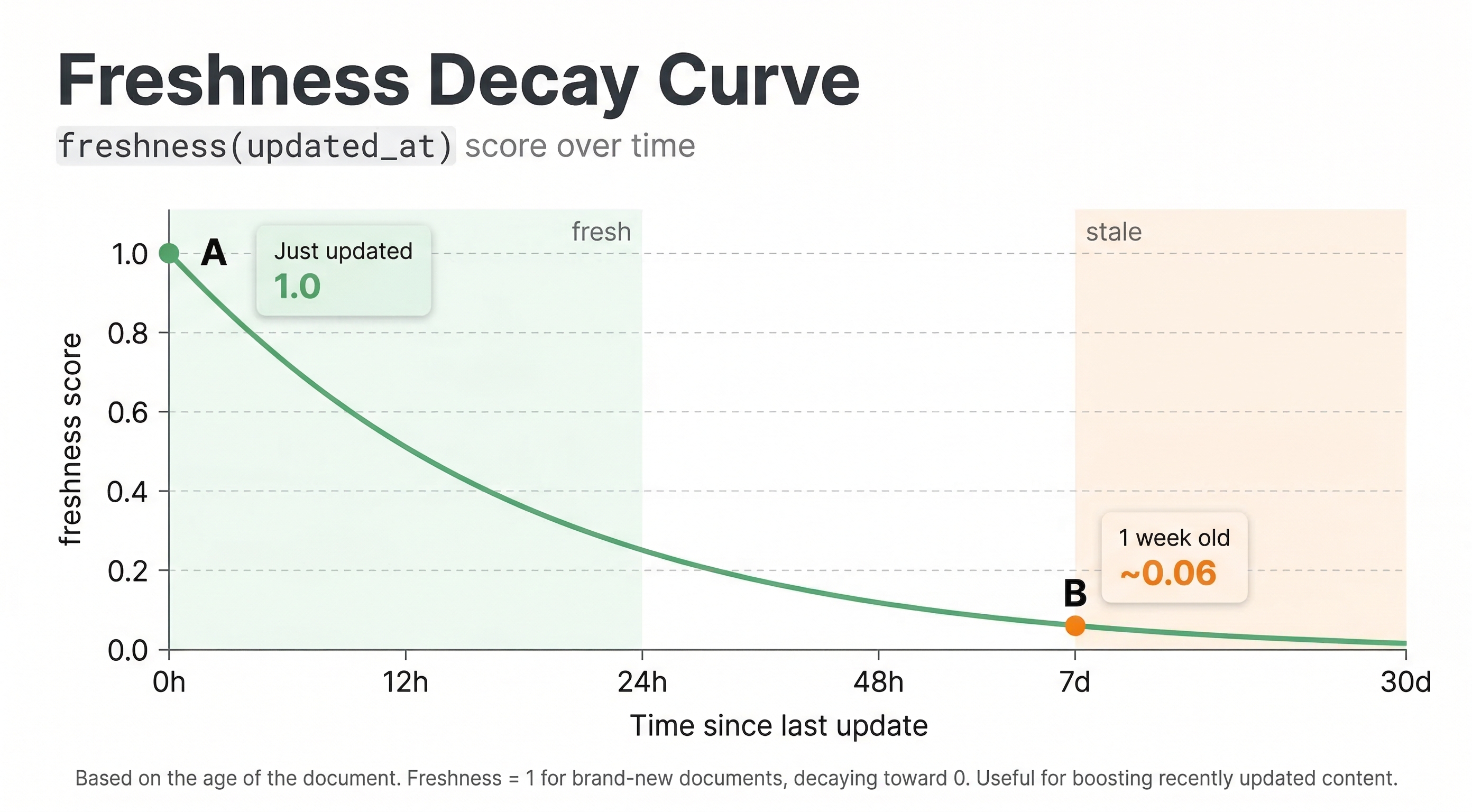
The freshness(field) function scores documents based on how recent a timestamp field is. It returns values between 0 and 1, with recent documents scoring near 1 and older documents scoring lower based on a configured half-life.
First, define a long field for your timestamp:
field publish_date type long {
  indexing: summary | attribute
}
Then use freshness in ranking:
rank-profile recent_first {
  first-phase {
    expression: bm25(title) + freshness(publish_date) * 1000
  }
}
The standard freshness function decays linearly to 0 at maxAge, which defaults to about 3 months. You can configure maxAge to control the decay window:
rank-profile custom_freshness {
  rank-properties {
    freshness(publish_date).maxAge: 2592000
  }
  first-phase {
    expression: freshness(publish_date)
  }
}
This sets maxAge to 30 days (2,592,000 seconds), so documents older than 30 days get a freshness score of 0. For a smoother decay curve, use freshness(publish_date).logscale in your expression instead, which has a configurable halfResponse (default 7 days) where the score equals 0.5.
closeness and distance
For vector search, closeness(dimension, field) provides a normalized similarity score between 0 and 1, while distance(dimension, field) gives the actual distance value according to your configured distance metric.
rank-profile semantic {
  inputs {
    query(q_embedding) tensor<float>(x[384])
  }
  first-phase {
    expression: closeness(field, embedding)
  }
}
```sd

Closeness is usually more convenient than distance for ranking because higher scores mean more relevance, matching the convention for other ranking features. Distance gives you the raw value if you need it for specific calculations.

## attribute

The `attribute(field)` function retrieves a field value marked as attribute in your schema. This is how you incorporate document metadata into ranking.

```sd
field popularity type double {
  indexing: summary | attribute
}

rank-profile with_popularity {
  first-phase {
    expression: bm25(title) + attribute(popularity) * 10
  }
}
Attributes must be numeric for use in ranking expressions. You can use ints, longs, floats, or doubles. The attribute function gives you direct access to these values for calculations.
if, max, min
Standard programming constructs work in ranking expressions. The if() function lets you implement conditional logic:
if(condition, true_expression, false_expression)
For example:
expression: if(attribute(in_stock), bm25(title) * 2, bm25(title) * 0.1)
This heavily penalizes out-of-stock items while boosting in-stock items.
The max() and min() functions choose between values:
expression: max(bm25(title), bm25(body))
This uses whichever field has better BM25 match. You can also use min() to take the lower value.
query
The query(name) function retrieves features passed as query parameters. This enables query-time customization of ranking.
rank-profile personalized {
  inputs {
    query(user_age) double: 0
  }
  first-phase {
    expression: bm25(title) + query(user_age) * attribute(age_relevance)
  }
}
You must declare query inputs with their types and defaults. Then pass values in queries:
vespa query "select * from product where title contains 'laptop'" \
  "ranking=personalized" \
  "input.query(user_age)=25"
This mechanism supports personalization and dynamic ranking adjustments without schema changes.
Combining Functions
Real ranking profiles combine multiple functions. Here is a realistic example:
rank-profile ecommerce {
  first-phase {
    expression {
      bm25(title) * 3 +
      bm25(description) +
      attribute(popularity) * 5 +
      attribute(rating) * 10 +
      if(attribute(in_stock), 50, -50) +
      freshness(updated_date) * 20
    }
  }
}
This combines text relevance on title and description with different weights, popularity and rating signals, a strong penalty for out-of-stock items, and a freshness bonus for recently updated products. The weights are tuned based on business priorities and testing.
Next Steps
You now understand the built-in ranking functions Vespa provides. The next chapter explores query-time controls that let you adjust ranking behavior per query without changing schemas.
For complete details on ranking features, see the rank features reference and the BM25 guide.