Query Functions
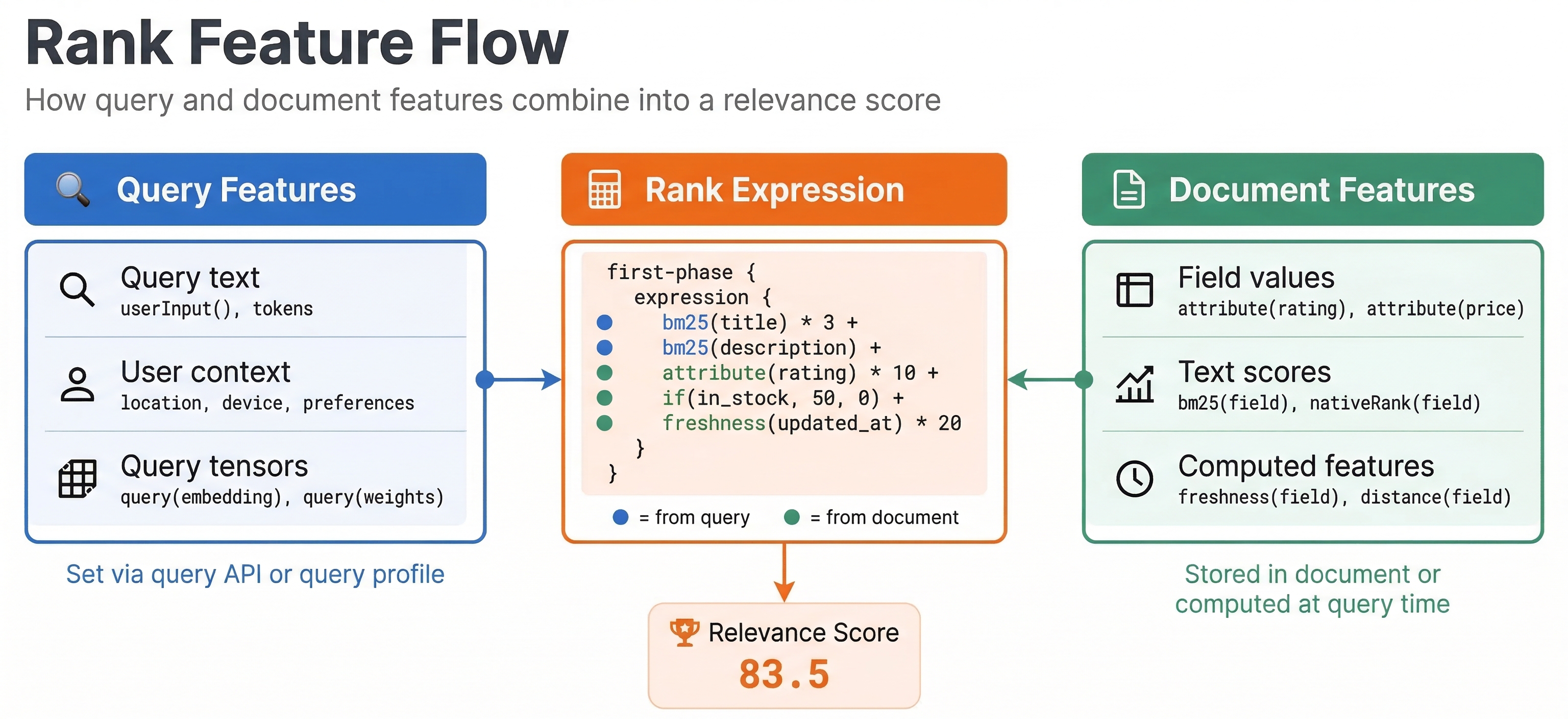
While rank profiles define your ranking logic, you often need to adjust ranking behavior per query. Different users, query types, or contexts need different ranking strategies. Query-time controls let you parameterize ranking without deploying new schemas. In this chapter, we explore term weights, query profiles, and query features that make ranking dynamic and flexible.
Term Weights
By default, all query terms have equal importance. But some terms matter more than others. Term weights let you boost or demote specific terms in a query.
In YQL, you can set term weights using annotations:
select * from product where title contains ({weight:200}"laptop") or title contains "computer"
The term "laptop" has weight 200 while "computer" has default weight 100. This makes matches on "laptop" contribute more to the score than matches on "computer". The ranking function sees these weights when computing term-based features like BM25.
You can also use negative weights to penalize terms:
select * from product where title contains "phone" and !(title contains ({weight:50}"case"))
This searches for phones but reduces scores for items that also mention "case", helping filter out accessories when the user wants the actual device.
Term weights work with any ranking function that uses term statistics. They provide fine-grained control over what parts of the query matter most.
Field Weights
You can also weight entire fields differently. This is done in the rank profile with the fieldMatch feature or by weighting field contributions explicitly:
rank-profile field_weighted {
  first-phase {
    expression: bm25(title) * 3 + bm25(description) * 1 + bm25(category) * 5
  }
}
Here category matches get the most weight, followed by title, then description. This expresses that category precision is most important, titles somewhat important, and descriptions least important.
Field weights can also be adjusted at query time using rank features. Define a profile that uses query parameters:
rank-profile dynamic_weights {
  inputs {
    query(title_weight) double: 2.0
    query(body_weight) double: 1.0
  }
  first-phase {
    expression: bm25(title) * query(title_weight) + bm25(body) * query(body_weight)
  }
}
Now you can adjust weights per query:
vespa query "select * from article where default contains 'vespa'" \
  "ranking=dynamic_weights" \
  "input.query(title_weight)=5.0" \
  "input.query(body_weight)=1.0"
This lets you tune the importance of different fields without redeploying.
Query Profiles
Query profiles are collections of default parameters stored separately from your schema. They let you define named sets of query settings for different use cases.
You create query profiles in search/query-profiles/ in your application package:
<query-profile id="default">
  <field name="hits">10</field>
  <field name="ranking">default</field>
  <field name="timeout">5s</field>
</query-profile>

<query-profile id="mobile">
  <field name="hits">5</field>
  <field name="ranking">mobile_optimized</field>
  <field name="timeout">2s</field>
</query-profile>
Then reference a profile in queries:
vespa query "select * from product where title contains 'phone'" \
  "queryProfile=mobile"
This applies all settings from the mobile profile. Query profiles help manage complexity when you have many query parameters and different query types. Instead of passing dozens of parameters per query, you reference a profile that bundles them together.
Profiles can inherit from each other to avoid repetition:
<query-profile id="base">
  <field name="timeout">5s</field>
</query-profile>

<query-profile id="mobile" inherits="base">
  <field name="hits">5</field>
</query-profile>
The mobile profile gets the timeout from base and adds its own hits setting.
Query Features
Query features are values you pass to ranking expressions at query time. We have seen query(name) in ranking expressions. You must declare these inputs in your rank profile:
rank-profile personalized {
  inputs {
    query(user_age) double: 25
    query(user_country) tensor<float>(country{})
  }
  first-phase {
    expression: bm25(title) + query(user_age) * 0.1
  }
}
The inputs section declares what features the query can provide, their types, and default values. If a query does not provide a value, the default is used.
Pass query features in the query:
vespa query "select * from product where title contains 'laptop'" \
  "ranking=personalized" \
  "input.query(user_age)=30"
Query features enable powerful customization. You can pass user preferences, contextual information, or any other data that should affect ranking. Common uses include user demographics, location, device type, time of day, or user behavior signals.
For tensor features like user embeddings:
input.query(user_embedding)=[0.1, 0.2, 0.3, ...]
Vespa parses the tensor from the parameter value and makes it available to your ranking expression.
Combining Query and Document Features
The real power comes from combining query features with document attributes. Here is a personalization example:
rank-profile category_personalized {
  inputs {
    query(user_category_preference) tensor<float>(category{})
  }
  first-phase {
    expression {
      bm25(title) +
      sum(query(user_category_preference) * attribute(category_vector))
    }
  }
}
This ranks documents by text relevance plus the dot product of the user's category preferences with the document's category vector. Documents matching the user's preferred categories rank higher.
Another example uses a precomputed relevance score stored on the document:
rank-profile boosted {
  inputs {
    query(boost_factor) double: 1.0
  }
  first-phase {
    expression: bm25(title) + attribute(editor_score) * query(boost_factor)
  }
}
This lets the frontend control how much weight the editor's curated score receives by passing different boost_factor values per query.
Dynamic Boosting
Query features let you boost specific values dynamically. For example, boosting products from a specific seller:
rank-profile seller_boost {
  inputs {
    query(preferred_seller_id) int
  }
  first-phase {
    expression: bm25(title) + if(attribute(seller_id) == query(preferred_seller_id), 100, 0)
  }
}
If the document seller matches the preferred seller, it gets a 100-point boost. This implements business rules like promoting your own inventory or highlighting partner products.
Query Profile Types
Query profiles are convenient, but what happens when someone passes a string where you expect a number? Or forgets to set a required tensor? You get confusing errors at query time. Query profile types solve this by adding type checking and validation at deploy time.
You define query profile types in the search/query-profiles/types/ directory of your application package:
<query-profile-type id="product-search">
<field name="ranking.features.query(user_age)" type="integer"/>
<field name="ranking.features.query(boost_factor)" type="double"/>
<field name="ranking.features.query(user_embedding)" type="tensor<float>(x[384])"/>
</query-profile-type>
This declares that user_age must be an integer, boost_factor must be a double, and user_embedding must be a specific tensor type. Vespa validates these constraints when you deploy your application, not when a query arrives.
To use the type, reference it from your query profile:
<query-profile id="default" type="product-search">
  <field name="ranking.features.query(user_age)">25</field>
  <field name="ranking.features.query(boost_factor)">1.0</field>
</query-profile>
The type attribute links this profile to the type definition. If you accidentally set user_age to "twenty-five" or provide a tensor with the wrong dimensions, the deployment will fail with a clear error message.
This is especially useful in production systems where multiple teams contribute query parameters. Type checking catches integration mistakes early, before they cause ranking failures in live traffic.
Personalization Patterns
Personalization combines user-specific signals with document features at query time. The key idea is simple: pass what you know about the user as query features, and let the rank profile blend those signals with document relevance. Here are several common patterns.
User context boosting. Pass a user segment or cohort as a query feature and boost documents tagged for that segment. This is the simplest form of personalization, useful for A/B tests or promotional campaigns.
Category affinity. Pass a sparse tensor of the user's category preferences (derived from browsing history), then compute a dot product with the document's category vector. Documents in categories the user frequently browses rank higher.
Location-aware ranking. Pass the user's location and boost nearby items using distance functions or geographic attributes. Useful for local commerce or delivery-time-sensitive searches.
Time-aware ranking. Weight freshness differently depending on query type. Trending queries might favor very recent items, while catalog browsing queries care less about recency.
Here is a complete personalization example that combines category affinity with price sensitivity:
rank-profile personalized_shopping {
  inputs {
    query(category_affinity) tensor<float>(category{})
    query(price_sensitivity) double: 0.5
  }
  first-phase {
    expression {
      bm25(title) * 2 +
      bm25(description) +
      sum(query(category_affinity) * attribute(category_scores)) * 20 +
      if(attribute(price) < 50, query(price_sensitivity) * 10, 0)
    }
  }
}
The category_affinity tensor holds per-category weights for this user. The dot product with attribute(category_scores) rewards documents in the user's preferred categories. The price sensitivity feature gives a bonus to affordable items when the user is price-conscious.
Pass these at query time:
input.query(category_affinity)={{category:shoes}:0.8,{category:tops}:0.3}
input.query(price_sensitivity)=0.9
The important principle here is keeping personalization signals in query features rather than baking them into rank profiles. Your user models can evolve independently of the search application. Update the recommendation system, retrain your user embeddings, add new user segments, all without redeploying your Vespa application.
Best Practices
Use query features for values that change per query or user. Do not hardcode user-specific data in rank profiles. Pass it as query features instead.
Provide sensible defaults for query features. Not every query will provide values, so defaults ensure ranking does not break.
Document what query features your rank profiles expect. This helps frontend developers know what parameters to pass.
Monitor which query features are actually used. If a feature is rarely provided, consider whether it adds value or just complexity.
Test ranking behavior with various query feature values. Make sure extreme values do not cause unexpected behavior.
Next Steps
You now understand how to control ranking at query time using term weights, field weights, query profiles, and query features. The next chapter explores grouping and aggregation for building faceted search and analytics.
For complete details, see the query profiles documentation and ranking expressions guide.