Architecture Overview
Understanding how Vespa is built helps you make better decisions when designing your applications. Vespa's architecture is what enables it to handle billions of documents, serve thousands of queries per second, and keep latency low even when running complex machine learning models. In this chapter, we will look at the main components of a Vespa system and how they work together.
The Big Picture
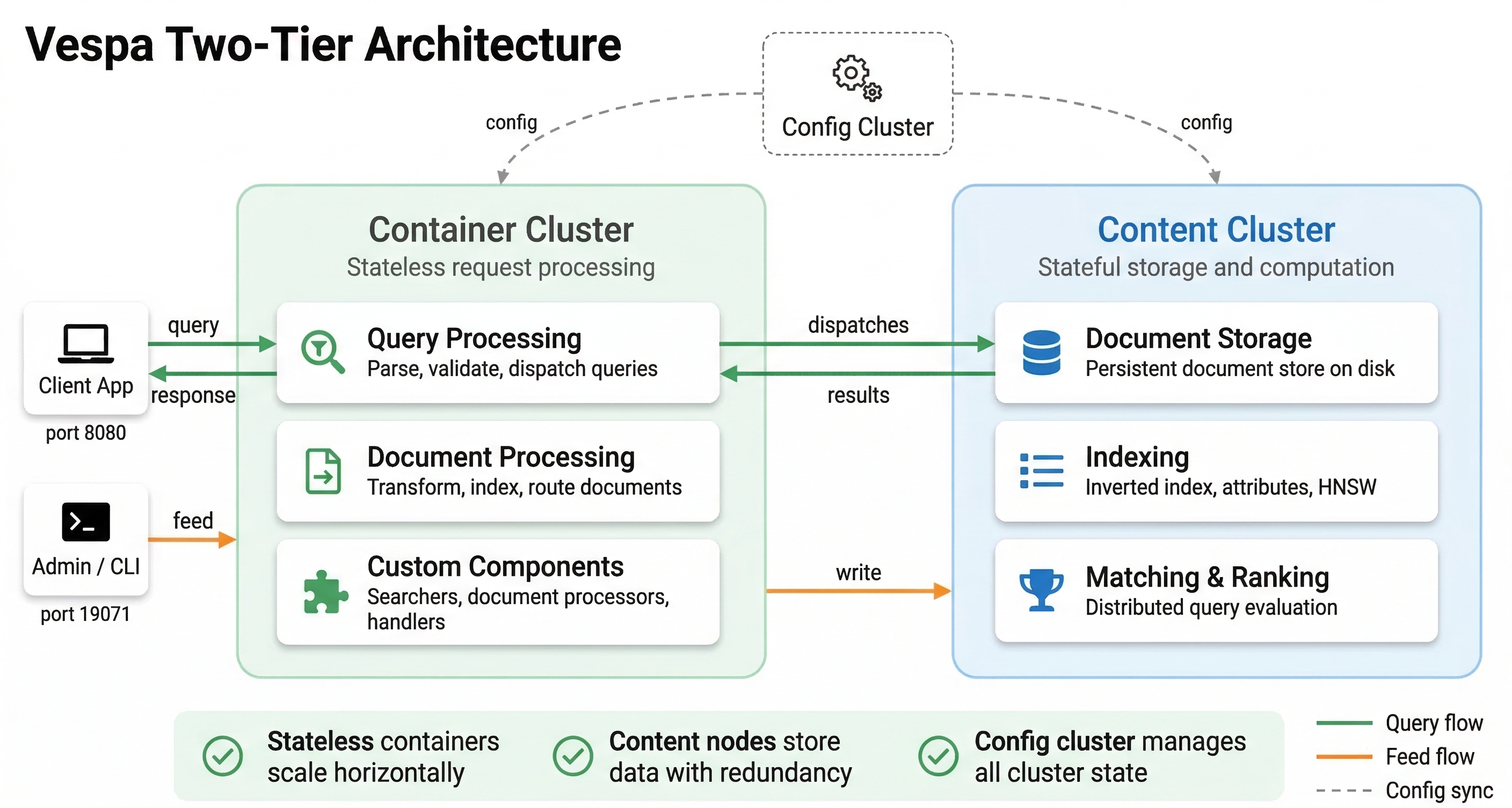
A Vespa system is made up of several types of nodes working together. Each type of node has a specific job, and the system is designed so that you can scale each part independently. This modular approach means you can add more query processing capacity without changing your storage, or increase storage without affecting query handling.
At the highest level, Vespa separates stateless operations from stateful ones. Stateless nodes handle incoming requests, process queries, and coordinate work across the system. Stateful nodes store your data, build indexes, and execute searches on their local data. This separation is key to how Vespa scales and maintains low latency.
Configuration Cluster
Before we dive into the nodes that do the actual work, we need to understand the configuration cluster. This is the control plane of your Vespa system. The configuration cluster manages your application's configuration and makes sure every node knows what it should be doing.
When you deploy an application to Vespa, you send an application package to the configuration server. The application package contains your schemas, ranking profiles, and cluster configuration. The configuration server takes this high-level description and derives the detailed configuration for every node in your system. It figures out which nodes should store data, which should handle queries, and how they should communicate.
The configuration system uses Apache ZooKeeper internally to store configuration data in a distributed way. This means you can run multiple configuration servers for redundancy. If one fails, another takes over. The configuration servers elect a master among themselves using a voting system. You typically run an odd number of configuration servers (like 3 or 5) so that a clear majority can always be established.
What makes this configuration system powerful is that it handles changes safely. When you deploy a new version of your application with schema changes or new ranking functions, the configuration server computes what needs to change and coordinates rolling out those changes without disrupting ongoing queries or writes. Vespa can reconfigure itself while staying online.
Every node in the system runs a local config proxy that caches configuration data. This means nodes don't have to constantly contact the configuration server. They get updates pushed to them when configuration changes, and they keep a local copy for fast access.
Container Nodes: The Stateless Layer
Container nodes are the stateless workhorses of Vespa. These Java-based nodes handle everything that doesn't require knowing about specific documents in advance. When a query arrives, it hits a container node. When you feed documents into Vespa, that goes through container nodes too.
Container nodes are stateless, which means they don't store any data permanently. If you restart a container node, it comes back up and starts working immediately without needing to load data or build indexes. This makes container nodes easy to scale. Need more query capacity? Add more container nodes. Want to reduce costs during low-traffic periods? Remove some container nodes. The operations are fast because there is no data to move around.
What do container nodes actually do? They handle query processing and orchestration. When a query arrives, the container node parses it, understands what the user is asking for, and determines which content nodes need to be involved. It then sends the query to those content nodes in parallel, waits for results, and merges them together. If your query needs to search across multiple content partitions, the container coordinates this scatter-gather operation.
Container nodes also run your custom Java code if you have any. You can write request processors that modify queries before they execute, result processors that transform results before sending them to users, and custom searchers that implement special logic. If you are integrating with external services or doing custom business logic, that code runs on container nodes.
For ranking, container nodes handle stateless model evaluation, where a model runs once per query for global features or for global-phase reranking of the final result set. The heavy per-document ranking (first-phase and second-phase) happens on content nodes, where models run against each candidate document using both query and document data. We will explore ranking in much more detail in later modules.
Container nodes also handle document feeding. When you send documents to Vespa, the container node receives them, validates them against your schema, and routes them to the correct content nodes based on how you have configured data distribution. The container layer provides a clean API for applications to interact with Vespa without needing to know the internal topology of content nodes.
Content Nodes: The Stateful Layer
Content nodes are where your actual data lives. These C++ based nodes store documents, build and maintain indexes, and execute searches on their local data. Content nodes are stateful, which means they hold data that persists across restarts and needs to be managed carefully.
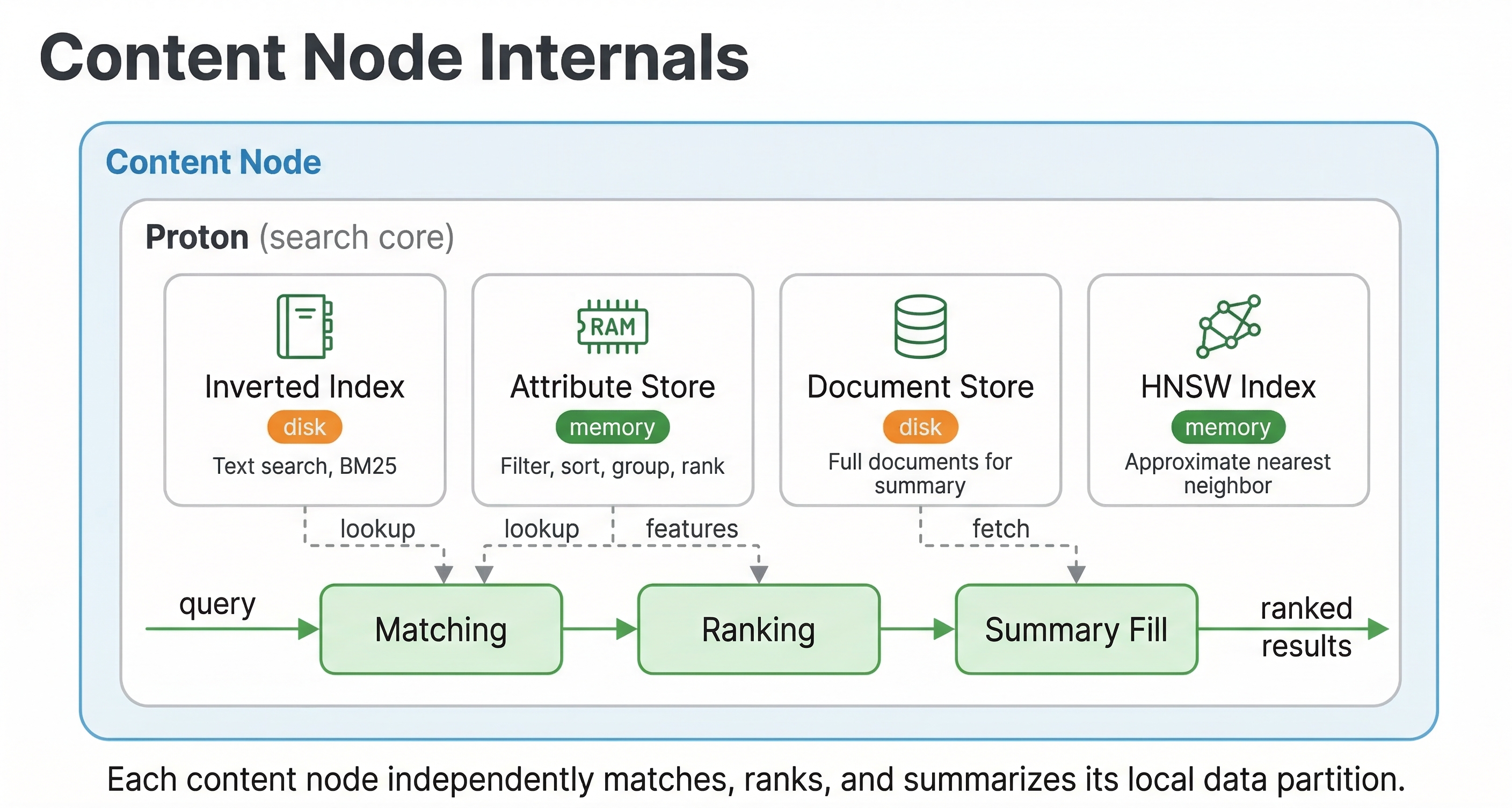
When you feed a document into Vespa, it gets assigned to one or more content nodes based on your data distribution configuration. The content node stores the document and updates all the relevant indexes. If you have text fields, it updates the text index. If you have vector fields configured for approximate nearest neighbor search, it updates the vector index. If you have attribute fields for filtering and sorting, those get indexed too.
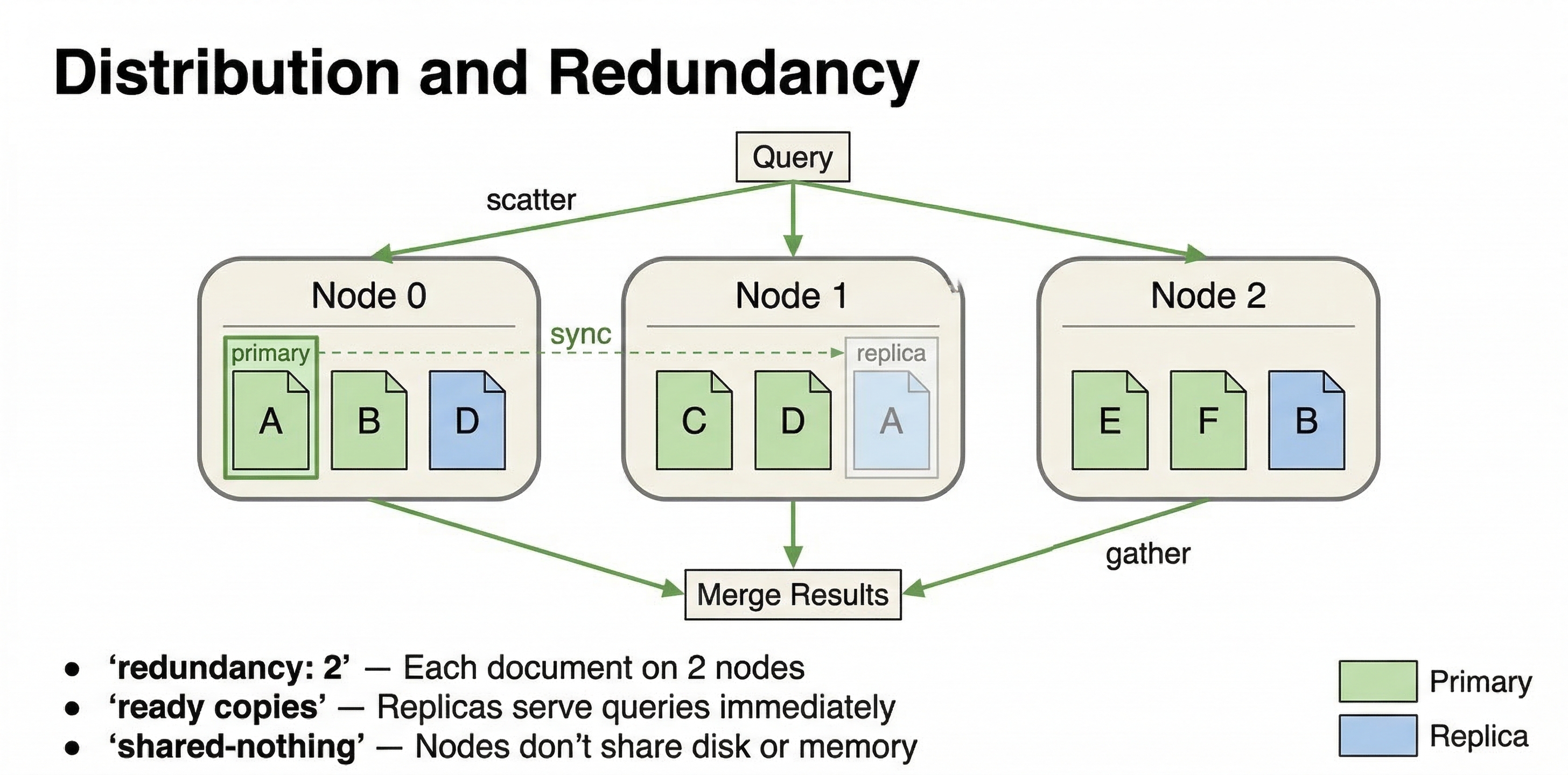
The key architectural principle here is that each content node works on its own slice of the data. Vespa uses a shared-nothing architecture where content nodes don't need to talk to each other during query execution. When a query arrives, each content node searches its local data independently and returns its local top results to the container node that coordinated the query. This parallelism is what makes Vespa fast.
Because computation happens where data lives, there is no need to move data across the network during queries. The content node has everything it needs locally: the document data, the indexes, and the ranking models. This locality is crucial for keeping latency low. Network round trips are expensive, and Vespa's architecture minimizes them.
Content nodes also handle real-time updates. You can update individual fields in documents without rewriting the entire document. You can delete documents. All of these operations happen in real time, and the changes become visible in queries within milliseconds. Attribute fields are stored in memory for fast access, while document store data and other fields can be served from disk. The system manages this automatically.
When you scale content nodes, data needs to be redistributed. If you add more content nodes to a cluster, Vespa automatically rebalances data across the new nodes. If you remove nodes, it moves data to the remaining nodes. This redistribution happens in the background while the system continues serving queries and accepting writes. However, it is more involved than scaling container nodes because data has to physically move between machines.
Cluster Controller
The cluster controller is a special component that monitors content nodes and maintains the cluster state. While the configuration cluster handles the logical configuration of your system, the cluster controller handles the runtime state.
The cluster controller constantly polls content nodes to check if they are alive and healthy. It tracks which nodes are up, which are down, which are in the process of starting up, and which are retiring (being removed from the cluster). This information gets compiled into a cluster state that is broadcast to all content nodes.
Why does this matter? Because content nodes need to know about each other to handle data distribution correctly. When a node goes down, the cluster controller detects this and updates the cluster state. The remaining nodes can then adjust their behavior. When a new node joins, the cluster controller orchestrates the process of moving data to that node.
Like the configuration servers, cluster controllers elect a master among themselves. The master does the actual polling and broadcasting while the other cluster controllers stand by ready to take over if the master fails. This redundancy ensures that cluster state management continues even if individual cluster controller nodes fail.
How It All Works Together
Let's walk through what happens when you deploy an application and run a query to see how these components interact.
When you deploy your application package, it goes to the configuration server. The server validates your schemas and configuration, computes the detailed config for every node, and pushes updates to all the nodes in your system. Container nodes receive configuration about query handling and document processing. Content nodes receive schema information about what fields to index and how. The cluster controller gets topology information about which content nodes exist.
Once deployed, content nodes are ready to receive documents. When you feed a document, it hits a container node through the feed API. The container node validates the document against the schema and determines which content node should store it based on the distribution configuration. It sends the document to that content node, which stores it and updates its indexes. Within milliseconds, the document is searchable.
When a query arrives, it also hits a container node. The container parses the query and determines which content nodes need to be searched. It sends the query in parallel to all relevant content nodes. Each content node searches its local data, applies the first phase ranking function to all matches, and returns its top candidates to the container. The container merges these results from all content nodes, applies any global phase ranking if configured, and returns the final results to the user.
Throughout this process, the cluster controller is monitoring node health. If a content node fails, the controller updates the cluster state and the system adapts. Queries get routed to the remaining healthy nodes. The configuration system keeps everything consistent, ensuring all nodes have the current application config.
Why This Design Scales
This architecture enables Vespa to scale in multiple dimensions. You can scale query capacity by adding container nodes without touching your data. You can scale data capacity by adding content nodes and letting Vespa redistribute the data. You can scale ranking complexity by using multi-phase ranking where expensive models run only on top candidates.
The shared-nothing architecture means there are no central bottlenecks. Each content node handles its slice independently. The stateless container layer means you can add capacity instantly. The separation of concerns means you can optimize each layer for its specific job: containers for coordination and request handling, content nodes for data and search, configuration cluster for consistency and control.
The locality of computation to data eliminates the latency of moving data across the network during queries. This is fundamentally different from architectures where you retrieve data from storage, send it to a separate compute layer for processing, and then return results. In Vespa, compute happens right where the data lives.
Next Steps
Now that you understand the architecture, the next chapter looks at when you should use Vespa versus other tools. Understanding the architecture helps you see why Vespa excels in certain scenarios and why simpler tools might be better for other use cases.
For more technical details on Vespa's architecture, see the Vespa architecture documentation and the overview guide.