Lab - Set Up and First Query
In this lab you will deploy your first Vespa application, feed a small product catalog, and run queries against it. By the end, you will have a running Vespa instance with real data that you will extend throughout the course.
Prerequisites
- The Vespa CLI installed (
vespa versionshould print a version number) - Docker path: Docker Desktop running with at least 4 GB of RAM allocated
- Cloud path: A Vespa Cloud account at console.vespa-cloud.com
If you have not set these up yet, go back to the Setting up Vespa chapter.
Start Vespa
Pick your deployment target. Both paths use the same Vespa CLI, and after this setup step all commands (deploy, feed, query) are identical.
- Docker (Local)
- Vespa Cloud
Configure the CLI for local development and start a Vespa container:
vespa config set target local

docker run --detach --name vespa --hostname vespa-container \
  --publish 8080:8080 --publish 19071:19071 \
  vespaengine/vespa
Wait for Vespa to be ready. This usually takes 30-60 seconds:
vespa status deploy --wait 300
Log in to Vespa Cloud and configure the CLI:
vespa config set target cloud
vespa auth login
This opens a browser window for authentication. Once logged in, set your application name (replace TENANT with your tenant name):
vespa config set application TENANT.ecommerce-app
Generate a data plane certificate for secure communication with your application:
vespa auth cert
This creates a key pair and adds the public certificate to your application package under security/clients.pem.
Create the Application Package
Create a directory for your application:
mkdir -p ecommerce-app/schemas
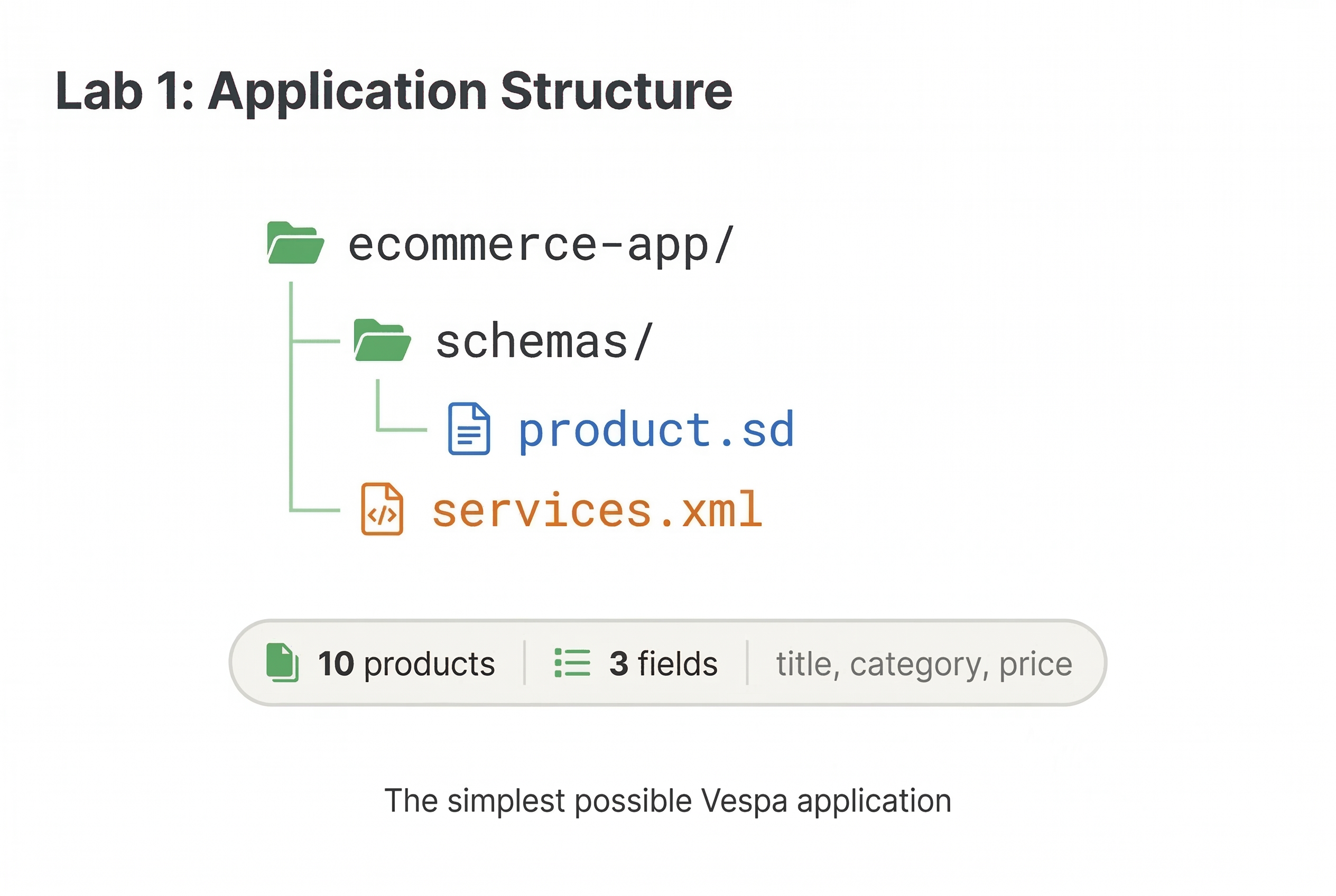
Create the schema file ecommerce-app/schemas/product.sd:
schema product {
  document product {
    field title type string {
      indexing: summary | index
    }

    field category type string {
      indexing: summary | attribute
    }

    field price type int {
      indexing: summary | attribute
    }
  }
}
This is a minimal product schema. title is indexed for text search. category and price are attributes for filtering and sorting.
Create ecommerce-app/services.xml:
<?xml version="1.0" encoding="UTF-8"?>
<services version="1.0">
  <container id="default" version="1.0">
    <search/>
    <document-api/>
  </container>

  <content id="content" version="1.0">
    <min-redundancy>1</min-redundancy>
    <documents>
      <document type="product" mode="index"/>
    </documents>
    <nodes>
      <node distribution-key="0" hostalias="node1"/>
    </nodes>
  </content>
</services>
Deploy
- Docker (Local)
- Vespa Cloud
vespa deploy --wait 300 ecommerce-app
You should see "Success" when the deployment completes.
vespa deploy --wait 600 ecommerce-app
The first cloud deployment takes a few minutes while Vespa provisions nodes. You can follow the progress in the Vespa Cloud console. Subsequent deployments are faster.
Your application is now running and ready to accept data.
Feed Products
Create a file called feed.jsonl with some products:
{"put": "id:product:product::1", "fields": {"title": "Cotton crew neck t-shirt", "category": "Tops", "price": 29}}
{"put": "id:product:product::2", "fields": {"title": "Slim fit jeans dark blue", "category": "Bottoms", "price": 79}}
{"put": "id:product:product::3", "fields": {"title": "Running shoes lightweight mesh", "category": "Shoes", "price": 120}}
{"put": "id:product:product::4", "fields": {"title": "Waterproof hiking jacket", "category": "Outerwear", "price": 189}}
{"put": "id:product:product::5", "fields": {"title": "Leather crossbody bag", "category": "Accessories", "price": 65}}
{"put": "id:product:product::6", "fields": {"title": "Wool blend overcoat", "category": "Outerwear", "price": 250}}
{"put": "id:product:product::7", "fields": {"title": "Striped cotton polo shirt", "category": "Tops", "price": 45}}
{"put": "id:product:product::8", "fields": {"title": "High-waist yoga leggings", "category": "Bottoms", "price": 55}}
{"put": "id:product:product::9", "fields": {"title": "Canvas sneakers white", "category": "Shoes", "price": 60}}
{"put": "id:product:product::10", "fields": {"title": "Stainless steel watch", "category": "Accessories", "price": 199}}
Feed the data:
vespa feed feed.jsonl
You should see a summary confirming all 10 documents were fed successfully:
{
  "feeder.operation.count": 10,
  "feeder.seconds": 0.199,
  "feeder.ok.count": 10,
  "feeder.ok.rate": 10.000,
  "feeder.error.count": 0,
  "feeder.inflight.count": 0,
  "http.request.count": 10,
  "http.response.count": 10,
  "http.response.error.count": 0,
  "http.response.code.counts": {
    "200": 10
  }
}
Run Queries
Search for products by title:
vespa query "select * from product where title contains 'shirt'"
You should see the cotton t-shirt and the polo shirt in the results:
{
    "root": {
        "id": "toplevel",
        "relevance": 1.0,
        "fields": {
            "totalCount": 2
        },
        "coverage": {
            "coverage": 100,
            "documents": 10,
            "full": true,
            "nodes": 1,
            "results": 1,
            "resultsFull": 1
        },
        "children": [
            {
                "id": "id:product:product::7",
                "relevance": 0.159683361827495,
                "source": "content",
                "fields": {
                    "title": "Striped cotton polo shirt",
                    "category": "Tops",
                    "price": 45
                }
            },
            {
                "id": "id:product:product::1",
                "relevance": 0.1596823061407008,
                "source": "content",
                "fields": {
                    "title": "Cotton crew neck t-shirt",
                    "category": "Tops",
                    "price": 29
                }
            }
        ]
    }
}
Filter by category:
vespa query "select * from product where category contains 'Outerwear'"
This returns the hiking jacket and the overcoat.
Combine text search with a price filter:
vespa query "select * from product where category contains 'Shoes' and price < 100"
Only the canvas sneakers should match (the running shoes cost 120).
Retrieve a specific document by ID:
vespa document get id:product:product::4
This returns the hiking jacket document with all its fields:
{
    "pathId": "/document/v1/product/product/docid/4",
    "id": "id:product:product::4",
    "fields": {
        "price": 189,
        "title": "Waterproof hiking jacket",
        "category": "Outerwear"
    }
}
Checkpoint
Verify your setup is working by running this query:
vespa query "select * from product where true" "hits=10"
You should see all 10 products in the response. The totalCount field should show 10.
What You Built
You now have a working Vespa application with:
- A
productschema with text search on titles and attribute fields for filtering - 10 products fed and searchable
- Basic queries combining text search and filters
Keep your Vespa instance running. In the next lab, you will extend this schema with more fields, feed a larger dataset, and write more sophisticated queries.
Pausing and Resuming (Optional)
If you need to stop and come back later:
- Docker (Local)
- Vespa Cloud
docker stop vespa
To resume:
docker start vespa
Your data and application persist across restarts. You do not need to redeploy or re-feed.
Your application stays running in the cloud. The dev environment auto-expires after 14 days of inactivity. You can extend it from the Vespa Cloud console if needed.