Lab - Reranking with a ML Model
In this lab you will add a second-phase reranker to your e-commerce application. You will log ranking features from Vespa, train a simple LightGBM model, deploy it, and compare the reranked results against the baseline.
Prerequisites
- Your Vespa container running with the hybrid search application from Lab 5
- Python 3.10+ with
lightgbm,pandas, andnumpyinstalled (pip install lightgbm pandas numpy)
Step 1: Log Ranking Features
First, add a rank profile that exposes all features we want to train on. Open ecommerce-app/schemas/product.sd and add this profile after the existing ones:
  rank-profile feature_logging inherits hybrid {
    second-phase {
      expression: bm25_score + closeness(field, embedding) * 5
      rerank-count: 20
    }
    summary-features {
      bm25(title)
      bm25(description)
      closeness(field, embedding)
      attribute(rating)
      attribute(price)
      attribute(in_stock)
      freshness(updated_at)
    }
  }
This profile inherits from hybrid so it uses the same first-phase logic. The summary-features block tells Vespa to include these feature values in every result, which we will use to build training data.
Deploy:
vespa deploy --wait 300 ecommerce-app
Step 2: Collect Training Data
Run a set of queries and collect the features. Create a file called queries.txt with sample queries:
shoes
jacket
cotton shirt
leather bag
running gear
warm winter clothing
casual everyday wear
workout clothes
formal outfit
waterproof outdoor
Create a Python script collect_features.py that queries Vespa and collects features:
import json
import subprocess
import csv

queries = open("queries.txt").read().strip().split("\n")
rows = []

for query in queries:
    cmd = [
        "vespa", "query",
        f'yql=select * from product where rank({{targetHits:20}}nearestNeighbor(embedding, q_embedding), default contains "{query}")',
        f'input.query(q_embedding)=embed(e5, "{query}")',
        "ranking=feature_logging",
        "hits=20",
        "format=json"
    ]
    result = subprocess.run(cmd, capture_output=True, text=True)
    data = json.loads(result.stdout)

    for i, hit in enumerate(data.get("root", {}).get("children", [])):
        fields = hit.get("fields", {})
        sf = fields.get("summaryfeatures", {})
        rows.append({
            "query": query,
            "doc_id": hit.get("id", ""),
            "position": i,
            "relevance": hit.get("relevance", 0),
            "bm25_title": sf.get("bm25(title)", 0),
            "bm25_description": sf.get("bm25(description)", 0),
            "closeness_score": sf.get("closeness(field,embedding)", 0),
            "rating": sf.get("attribute(rating)", 0),
            "price": sf.get("attribute(price)", 0),
            "in_stock": sf.get("attribute(in_stock)", 0),
            "freshness_score": sf.get("freshness(updated_at)", 0),
        })

with open("training_data.csv", "w", newline="") as f:
    writer = csv.DictWriter(f, fieldnames=rows[0].keys())
    writer.writeheader()
    writer.writerows(rows)

print(f"Collected {len(rows)} rows from {len(queries)} queries")
Run it:
python collect_features.py
Step 3: Train a LightGBM Model
With a real application, you would use click logs or human judgments as labels. For this lab, we simulate relevance labels based on position (top results are more relevant). Create train_model.py:
import pandas as pd
import lightgbm as lgb
import numpy as np

df = pd.read_csv("training_data.csv")

# Simulate relevance labels: position 0 gets label 3, position 1-2 gets 2, etc.
df["label"] = np.where(df["position"] == 0, 3,
              np.where(df["position"] <= 2, 2,
              np.where(df["position"] <= 5, 1, 0)))

features = ["bm25_title", "bm25_description", "closeness_score", "rating", "price", "in_stock", "freshness_score"]
X = df[features]
y = df["label"]

# Group by query for LambdaRank
groups = df.groupby("query").size().values

train_data = lgb.Dataset(X, label=y, group=groups)

params = {
    "objective": "lambdarank",
    "metric": "ndcg",
    "ndcg_eval_at": [5],
    "num_leaves": 8,
    "learning_rate": 0.1,
    "num_iterations": 50,
    "verbose": -1,
}

model = lgb.train(params, train_data)

# Export as JSON for Vespa (must use dump_model, not save_model)
import json as json_mod
with open("ecommerce-app/models/ranking_model.json", "w") as f:
    json_mod.dump(model.dump_model(), f, indent=2)
print("Model saved to ecommerce-app/models/ranking_model.json")

# Show feature importance
importance = dict(zip(features, model.feature_importance()))
for feat, imp in sorted(importance.items(), key=lambda x: -x[1]):
    print(f"  {feat}: {imp}")
Run it:
mkdir -p ecommerce-app/models
python train_model.py
The script trains a small LightGBM model and exports it as JSON, which Vespa can evaluate natively. The feature importance printout will look like this:
Model saved to ecommerce-app/models/ranking_model.json
  closeness_score: 217
  rating: 66
  price: 61
  bm25_title: 0
  bm25_description: 0
  in_stock: 0
  freshness_score: 0
closeness_score dominates because the simulated relevance labels closely follow the hybrid first-phase ordering, and within that, the embedding similarity does most of the work. With a real click log you would expect a more even distribution.
Step 4: Deploy the Model
Add a rank profile that uses the LightGBM model as a second-phase reranker. Open ecommerce-app/schemas/product.sd and add:
  rank-profile ltr_reranker inherits hybrid {
    # Map training feature names to Vespa rank features.
    # Functions that share a name with a built-in feature (closeness, freshness)
    # must be renamed to avoid recursive shadowing in their own bodies.
    function bm25_title() {
      expression: bm25(title)
    }
    function bm25_description() {
      expression: bm25(description)
    }
    function closeness_score() {
      expression: closeness(field, embedding)
    }
    function rating() {
      expression: attribute(rating)
    }
    function price() {
      expression: attribute(price)
    }
    function in_stock() {
      expression: attribute(in_stock)
    }
    function freshness_score() {
      expression: freshness(updated_at)
    }

    second-phase {
      expression: lightgbm("ranking_model.json")
      rerank-count: 20
    }
    match-features {
      bm25_title
      bm25_description
      closeness_score
      rating
      price
      in_stock
      freshness_score
    }
  }
The lightgbm() function evaluates the model file from the models/ directory. Vespa maps feature names from the model's feature_names array to rank features. Since the training script uses short column names like bm25_title and closeness, we define functions with those exact names that map to the corresponding Vespa rank features.
Deploy:
vespa deploy --wait 300 ecommerce-app
Step 5: Compare Results
Run the same query with the baseline hybrid profile and the LTR reranker:
Baseline (hybrid with RRF):
vespa query 'yql=select * from product where rank({targetHits:10}nearestNeighbor(embedding, q_embedding), default contains "shoes")' \
  'input.query(q_embedding)=embed(e5, "shoes")' \
  'ranking=hybrid' \
  'hits=5'
LTR reranker:
vespa query 'yql=select * from product where rank({targetHits:10}nearestNeighbor(embedding, q_embedding), default contains "shoes")' \
  'input.query(q_embedding)=embed(e5, "shoes")' \
  'ranking=ltr_reranker' \
  'hits=5'
Compare the result ordering. The LTR model may reorder results based on the patterns it learned from the training data. Check the matchfeatures to see the individual feature values and understand why the model ranked documents differently.
Try another query:
vespa query 'yql=select * from product where rank({targetHits:10}nearestNeighbor(embedding, q_embedding), default contains "warm jacket")' \
  'input.query(q_embedding)=embed(e5, "warm jacket")' \
  'ranking=ltr_reranker' \
  'hits=5'
Checkpoint
Run this query with the LTR profile:
vespa query 'yql=select * from product where rank({targetHits:10}nearestNeighbor(embedding, q_embedding), default contains "leather")' \
  'input.query(q_embedding)=embed(e5, "leather")' \
  'ranking=ltr_reranker' \
  'hits=3'
Verify that:
- Results are returned with scores from the LightGBM model
- Each hit has
matchfeatureswith all 7 features - The ordering reflects the model's learned preferences (likely favoring in-stock, higher-rated products)
The top hit looks like this:
{
    "id": "id:product:product::5",
    "relevance": 0.03278688524590164,
    "fields": {
        "matchfeatures": {
            "bm25_description": 1.5359246609769748,
            "bm25_title": 1.6290452419685604,
            "closeness_score": 0.6270164148973559,
            "freshness_score": 0.0,
            "in_stock": 1.0,
            "price": 65.0,
            "rating": 4.099999904632568
        },
        "title": "Leather crossbody bag"
    }
}
The relevance score comes from the LightGBM model's prediction on the seven features. Compare this with the baseline hybrid profile's relevance for the same query - the absolute numbers will differ (LightGBM emits a small score in the [0, 1] range from the lambdarank objective, while hybrid's RRF score has its own scale), but the ordering reflects what the model learned.
Final Application Structure
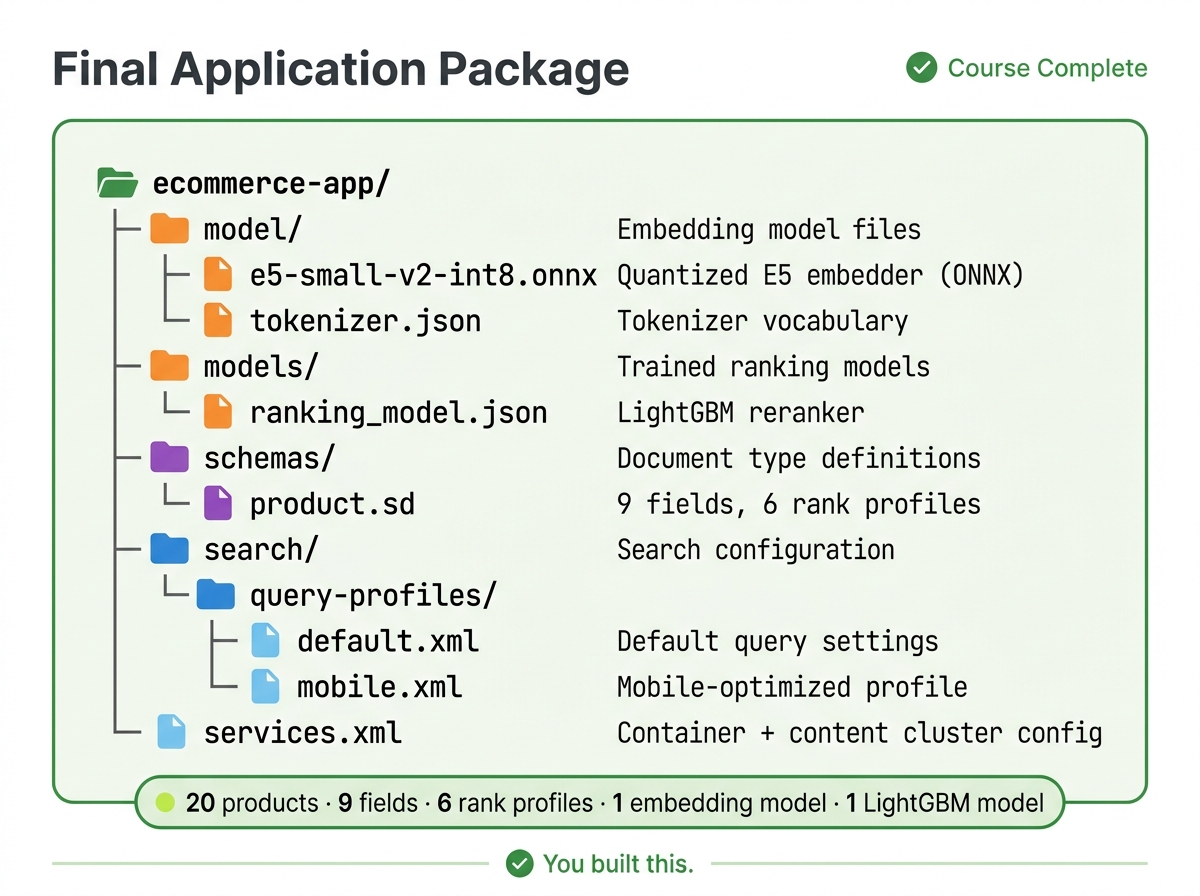
Your complete application package:
ecommerce-app/
├── model/
│   ├── e5-small-v2-int8.onnx
│   └── tokenizer.json
├── models/
│   └── ranking_model.json
├── schemas/
│   └── product.sd
├── search/
│   └── query-profiles/
│       ├── default.xml
│       └── mobile.xml
└── services.xml
What You Built
Over 6 labs, you built a complete e-commerce search application:
- Lab 1: Basic schema, deployment, and first queries
- Lab 2: Rich schema with multiple field types, partial updates, filtering, sorting
- Lab 3: Proper application package with query profiles
- Lab 4: Multi-signal ranking with BM25, rating, freshness, and in-stock boosting, plus faceted navigation
- Lab 5: Vector embeddings with a built-in model, semantic search, and hybrid retrieval with RRF
- Lab 6: Machine learning reranking with a LightGBM model trained on Vespa features
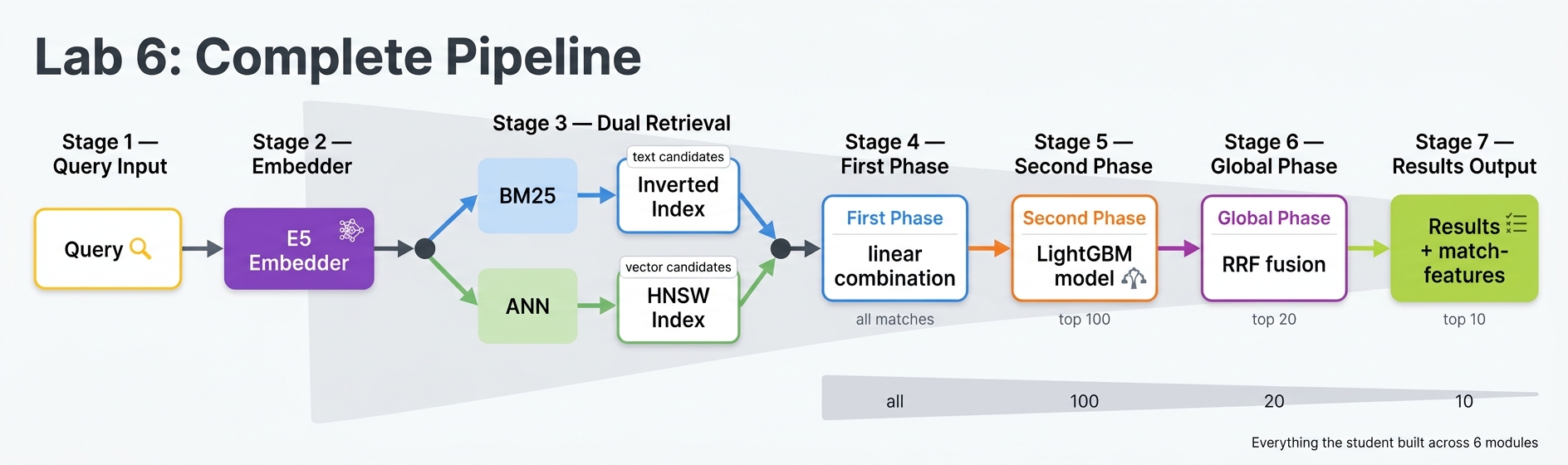
This is a production-shaped search pipeline. A real application would use a larger dataset, real click logs for training labels, and more sophisticated feature engineering, but the architecture is the same.